---
author: eavena
ms.author: eravena
ms.date: 10/02/2018
ms.reviewer:
audience: itpro
manager: dansimp
ms.prod: edge
ms.topic: include
---
>*Supported versions: Microsoft Edge on Windows 10*
>*Default setting: Enabled (Turned on)*
[!INCLUDE [configure-windows-defender-smartscreen-shortdesc](../shortdesc/configure-windows-defender-smartscreen-shortdesc.md)]
### Supported values
| Group Policy | MDM | Registry | Description | Most restricted |
|----------------|:-----:|:--------:|-----------------------------------------------------------------------------------------------|:------------------------------------------------:|
| Not configured | Blank | Blank | Users can choose to use Windows Defender SmartScreen. | |
| Disabled | 0 | 0 | Turned off. Do not protect users from potential threats and prevent users from turning it on. | |
| Enabled | 1 | 1 | Turned on. Protect users from potential threats and prevent users from turning it off. |  |
---
To verify Windows Defender SmartScreen is turned off (disabled):
1. Click or tap **More** (…) and select **Settings** > **View Advanced settings**.
2. Verify the setting **Help protect me from malicious sites and download with SmartScreen Filter** is disabled.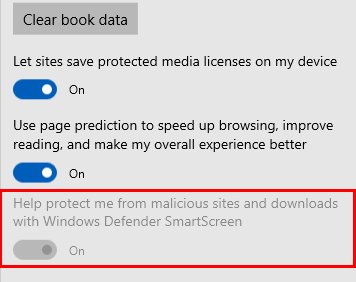
### ADMX info and settings
#### ADMX info
- **GP English name:** Configure Windows Defender SmartScreen
- **GP name:** AllowSmartScreen
- **GP path:** Windows Components/Microsoft Edge
- **GP ADMX file name:** MicrosoftEdge.admx
#### MDM settings
- **MDM name:** Browser/[AllowSmartScreen](https://docs.microsoft.com/windows/client-management/mdm/policy-csp-browser#browser-allowsmartscreen)
- **Supported devices:** Desktop and Mobile
- **URI full path:** ./Vendor/MSFT/Policy/Config/Browser/AllowSmartScreen
- **Data type:** Integer
#### Registry settings
- **Path:** HKLM\SOFTWARE\Policies\Microsoft\MicrosoftEdge\PhishingFilter
- **Value name:** EnabledV9
- **Value type:** REG_DWORD