---
title: 5031(F) The Windows Firewall Service blocked an application from accepting incoming connections on the network. (Windows 10)
ms.reviewer:
manager: dansimp
ms.author: dansimp
description: Describes security event 5031(F) The Windows Firewall Service blocked an application from accepting incoming connections on the network.
ms.pagetype: security
ms.prod: w10
ms.mktglfcycl: deploy
ms.sitesec: library
ms.localizationpriority: none
author: dansimp
---
# 5031(F): The Windows Firewall Service blocked an application from accepting incoming connections on the network.
**Applies to**
- Windows 10
- Windows Server 2016
- Windows Server 2012 R2
- Windows Server 2012
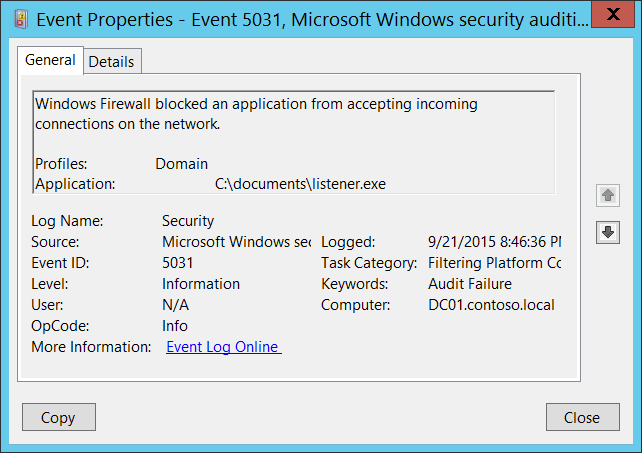 ***Subcategory:*** [Audit Filtering Platform Connection](audit-filtering-platform-connection.md)
***Event Description:***
This event generates when an application was blocked from accepting incoming connections on the network by [Windows Filtering Platform](https://msdn.microsoft.com/library/windows/desktop/aa366510(v=vs.85).aspx).
If you don’t have any firewall rules (Allow or Deny) in Windows Firewall for specific applications, you will get this event from [Windows Filtering Platform](https://msdn.microsoft.com/library/windows/desktop/aa366510(v=vs.85).aspx) layer, because by default this layer is denying any incoming connections.
> **Note** For recommendations, see [Security Monitoring Recommendations](#security-monitoring-recommendations) for this event.
***Subcategory:*** [Audit Filtering Platform Connection](audit-filtering-platform-connection.md)
***Event Description:***
This event generates when an application was blocked from accepting incoming connections on the network by [Windows Filtering Platform](https://msdn.microsoft.com/library/windows/desktop/aa366510(v=vs.85).aspx).
If you don’t have any firewall rules (Allow or Deny) in Windows Firewall for specific applications, you will get this event from [Windows Filtering Platform](https://msdn.microsoft.com/library/windows/desktop/aa366510(v=vs.85).aspx) layer, because by default this layer is denying any incoming connections.
> **Note** For recommendations, see [Security Monitoring Recommendations](#security-monitoring-recommendations) for this event.
***Event XML:***
```
-
-
5031
0
0
12810
0
0x8010000000000000
304373
Security
DC01.contoso.local
-
Domain
C:\\documents\\listener.exe
```
***Required Server Roles:*** None.
***Minimum OS Version:*** Windows Server 2008, Windows Vista.
***Event Versions:*** 0.
***Field Descriptions:***
- **Profiles** \[Type = UnicodeString\]: network profile using which application was blocked. Possible values:
- Domain
- Public
- Private
- **Application** \[Type = UnicodeString\]: full path and file name of executable file for blocked application.
## Security Monitoring Recommendations
For 5031(F): The Windows Firewall Service blocked an application from accepting incoming connections on the network.
- You can use this event to detect applications for which no Windows Firewall rules were created.
- If you have a pre-defined application which should be used to perform the operation that was reported by this event, monitor events with “**Application**” not equal to your defined application.
- You can monitor to see if “**Application**” is not in a standard folder (for example, not in **System32** or **Program Files**) or is in a restricted folder (for example, **Temporary Internet Files**).
- If you have a pre-defined list of restricted substrings or words in application names (for example, “**mimikatz**” or “**cain.exe**”), check for these substrings in “**Application**.”