---
title: Upgrade Readiness - Identify important apps (Windows 10)
ms.reviewer:
manager: laurawi
ms.author: greglin
description: Describes how to prepare your environment so that you can use Upgrade Readiness to manage Windows upgrades.
ms.prod: w10
audience: itpro
author: greg-lindsay
ms.topic: article
ms.collection: M365-analytics
---
# Upgrade Readiness - Step 1: Identify important apps
This is the first step of the Upgrade Readiness workflow. In this step, applications are listed and grouped by importance level. Setting the importance level enables you to prioritize applications for upgrade.
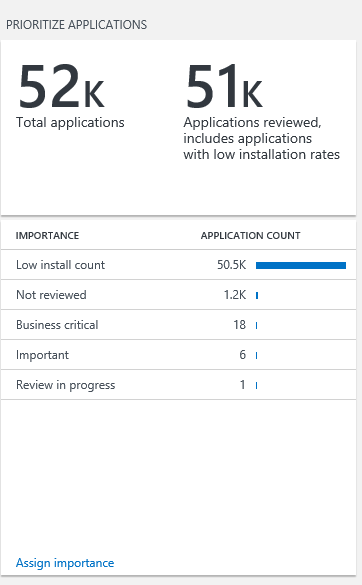
Select **Assign importance** to change an application’s importance level. By default, applications are marked **Not reviewed** or **Low install count** until you assign a different importance level to them.
To change an application’s importance level:
1. Select **Not reviewed** or **Low install count** on the **Prioritize applications** blade to view the list of applications with that importance level.
2. Select the applications you want to change to a specific importance level and then select the appropriate option from the **Select importance level** list.
3. Click **Save** when finished.
Importance levels include:
| Importance level | When to use it | Recommendation |
|--------------------|------------------|------------------|
| Low install count | We give you a head start by identifying applications that are installed on 2% or less of your total computer inventory. \[Number of computers application is installed on/total number of computers in your inventory.\]
Low install count applications are automatically marked as **Ready to upgrade** in the **UpgradeDecision** column unless they have issues that need attention.
| Be sure to review low install count applications for any business critical or important applications that are not yet upgrade-ready, despite their low installation rates. For example, payroll apps or tax accounting apps tend to be installed on a relatively small number of machines but are still considered business critical applications.
|
| Not reviewed | Applications that are installed on more than 2% of your total computer inventory are marked not reviewed until you set their importance level.
| Once you’ve started to investigate an application to determine its importance level and upgrade readiness, change its status to **Review in progress** in both the **Importance** and **UpgradeDecision** columns. |
| Business critical | By default, no applications are marked as business critical because only you can make that determination. If you know that an application is critical to your organization’s functioning, mark it **Business critical**.
| You may also want to change the application’s status to **Review in progress** in the **UpgradeDecision** column to let other team members know that you’re working on getting this business critical application upgrade-ready. Once you’ve fixed any issues and validated that the application will migrate successfully, change the upgrade decision to **Ready to upgrade**.
|
| Important | By default, no applications are marked as important because only you can make that determination. If the application is important but not critical to your organization’s functioning, mark it **Important**. | You may also want to change the application’s status to **Review in progress** in the **UpgradeDecision** column to let other team members know that you’re working on getting this important application upgrade-ready. Once you’ve fixed any issues and validated that the application will migrate successfully, change the upgrade decision to **Ready to upgrade**.
|
| Ignore | By default, no applications are marked as ignore because only you can make that determination. If the application is not important to your organization’s functioning, such as user-installed applications and games, you may not want to spend time and money validating that these applications will migrate successfully. Mark these applications **Ignore**.
| Set the application’s importance level to **Ignore** to let other team members know that it can be left as-is with no further investigation or testing. If you set the importance level to ignore, and this is an app that you are not planning on testing or validating, consider changing the upgrade decision to **Ready to upgrade**. By marking these apps ready to upgrade, you are indicating that you are comfortable upgrading with the app remaining in its current state.
|
| Review in progress | Once you’ve started to investigate an application to determine its importance level and upgrade readiness, change its status to **Review in progress** in both the **Importance** and **UpgradeDecision** columns.
| As you learn more about the application’s importance to your organization’s functioning, change the importance level to **Business critical**, **Important**, or **Ignore**.
Until you’ve determined that priority applications will migrate successfully, leave the upgrade decision status as **Review in progress**.
|