---
title: 4610(S) An authentication package has been loaded by the Local Security Authority. (Windows 10)
description: Describes security event 4610(S) An authentication package has been loaded by the Local Security Authority.
ms.pagetype: security
ms.prod: w10
ms.mktglfcycl: deploy
ms.sitesec: library
ms.localizationpriority: none
author: dansimp
ms.date: 04/19/2017
ms.reviewer:
manager: dansimp
ms.author: dansimp
---
# 4610(S): An authentication package has been loaded by the Local Security Authority.
**Applies to**
- Windows 10
- Windows Server 2016
 ***Subcategory:*** [Audit Security System Extension](audit-security-system-extension.md)
***Event Description:***
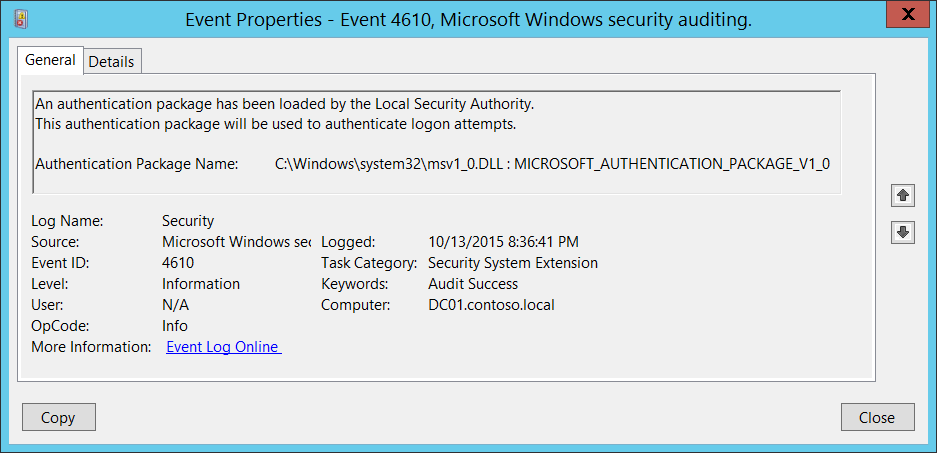
This event generates every time [Authentication Package](https://msdn.microsoft.com/library/windows/desktop/aa374733(v=vs.85).aspx) has been loaded by the Local Security Authority ([LSA](https://msdn.microsoft.com/library/windows/desktop/aa378326(v=vs.85).aspx)).
Each time the system starts, the LSA loads the Authentication Package DLLs from **HKEY\_LOCAL\_MACHINE\\SYSTEM\\CurrentControlSet\\Control\\Lsa\\Authentication Packages** registry value and performs the initialization sequence for every package located in these DLLs.
> **Note** For recommendations, see [Security Monitoring Recommendations](#security-monitoring-recommendations) for this event.
***Subcategory:*** [Audit Security System Extension](audit-security-system-extension.md)
***Event Description:***
This event generates every time [Authentication Package](https://msdn.microsoft.com/library/windows/desktop/aa374733(v=vs.85).aspx) has been loaded by the Local Security Authority ([LSA](https://msdn.microsoft.com/library/windows/desktop/aa378326(v=vs.85).aspx)).
Each time the system starts, the LSA loads the Authentication Package DLLs from **HKEY\_LOCAL\_MACHINE\\SYSTEM\\CurrentControlSet\\Control\\Lsa\\Authentication Packages** registry value and performs the initialization sequence for every package located in these DLLs.
> **Note** For recommendations, see [Security Monitoring Recommendations](#security-monitoring-recommendations) for this event.
***Event XML:***
```
-
-
4610
0
0
12289
0
0x8020000000000000
1048138
Security
DC01.contoso.local
-
C:\\Windows\\system32\\msv1\_0.DLL : MICROSOFT\_AUTHENTICATION\_PACKAGE\_V1\_0
```
***Required Server Roles:*** None.
***Minimum OS Version:*** Windows Server 2008, Windows Vista.
***Event Versions:*** 0.
***Field Descriptions:***
**Authentication Package Name** \[Type = UnicodeString\]**:** the name of loaded [Authentication Package](https://msdn.microsoft.com/library/windows/desktop/aa374733(v=vs.85).aspx). The format is: DLL\_PATH\_AND\_NAME: AUTHENTICATION\_PACKAGE\_NAME.
By default the only one Authentication Package loaded by Windows 10 is “[MICROSOFT\_AUTHENTICATION\_PACKAGE\_V1\_0](https://msdn.microsoft.com/library/windows/desktop/aa378753(v=vs.85).aspx)”.
## Security Monitoring Recommendations
For 4610(S): An authentication package has been loaded by the Local Security Authority.
- Report all “**Authentication Package Name**” not equals “C:\\Windows\\system32\\msv1\_0.DLL : MICROSOFT\_AUTHENTICATION\_PACKAGE\_V1\_0”, because by default this is the only Authentication Package loaded by Windows 10.
- Typically this event has an informational purpose. If you have a pre-defined list of allowed Authentication Packages in the system, then you can check whether “**Authentication Package Name”** is in your defined list.