---
title: 5159(F) The Windows Filtering Platform has blocked a bind to a local port. (Windows 10)
description: Describes security event 5159(F) The Windows Filtering Platform has blocked a bind to a local port.
ms.pagetype: security
ms.prod: w10
ms.mktglfcycl: deploy
ms.sitesec: library
ms.localizationpriority: none
author: dansimp
ms.date: 04/19/2017
ms.reviewer:
manager: dansimp
ms.author: dansimp
---
# 5159(F): The Windows Filtering Platform has blocked a bind to a local port.
**Applies to**
- Windows 10
- Windows Server 2016
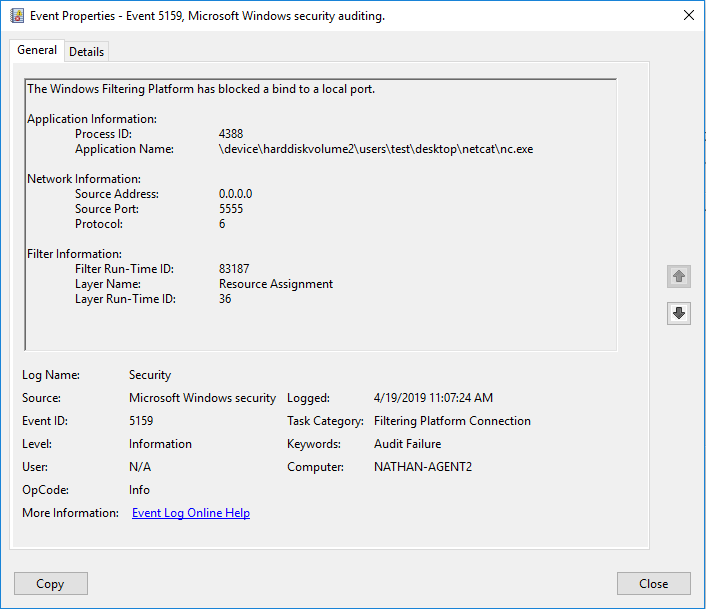 ***Subcategory:*** [Audit Filtering Platform Connection](audit-filtering-platform-connection.md)
***Event Description:***
This event is logged if the Windows Filtering Platform has blocked a bind to a local port.
***Subcategory:*** [Audit Filtering Platform Connection](audit-filtering-platform-connection.md)
***Event Description:***
This event is logged if the Windows Filtering Platform has blocked a bind to a local port.
***Event XML:***
```
-
-
5159
0
0
12810
0
0x8010000000000000
44097
Security
DC01.contoso.local
-
7924
\device\harddiskvolume2\users\test\desktop\netcat\nc.exe
0.0.0.0
5555
6
84614
%%14608
36
```
***Required Server Roles:*** None.
***Minimum OS Version:*** Windows Server 2008, Windows Vista.
***Event Versions:*** 0.
***Field Descriptions:***
**Application Information**:
- **Process ID** \[Type = Pointer\]: hexadecimal Process ID of the process which was permitted to bind to the local port. Process ID (PID) is a number used by the operating system to uniquely identify an active process. To see the PID for a specific process you can, for example, use Task Manager (Details tab, PID column):
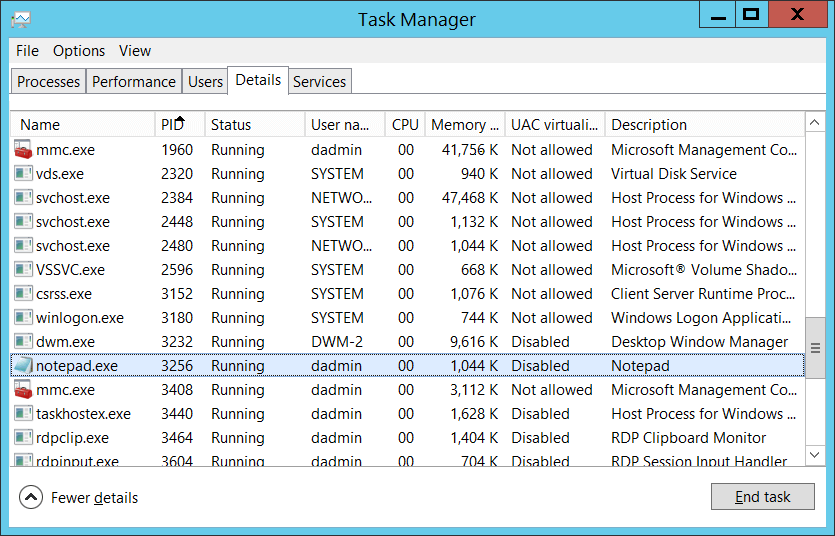 If you convert the hexadecimal value to decimal, you can compare it to the values in Task Manager.
You can also correlate this process ID with a process ID in other events, for example, “[4688](event-4688.md): A new process has been created” **Process Information\\New Process ID**.
- **Application Name** \[Type = UnicodeString\]**:** full path and the name of the executable for the process.
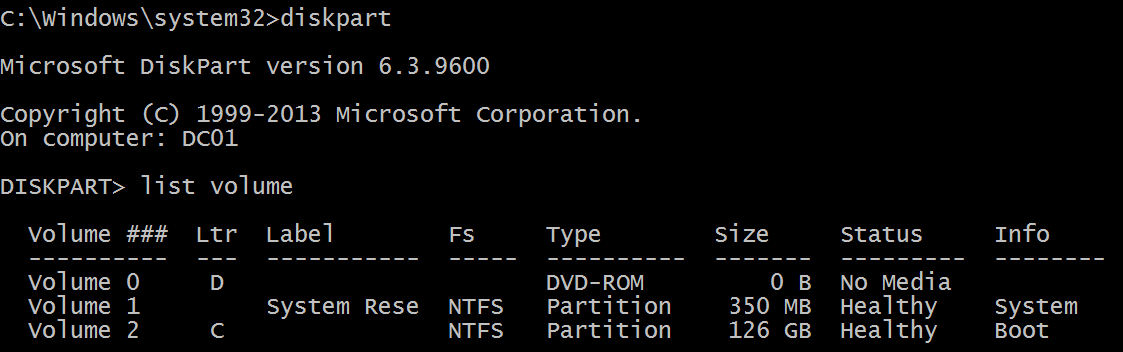
Logical disk is displayed in format \\device\\harddiskvolume\#. You can get all local volume numbers by using **diskpart** utility. The command to get volume numbers using diskpart is “**list volume”**:
If you convert the hexadecimal value to decimal, you can compare it to the values in Task Manager.
You can also correlate this process ID with a process ID in other events, for example, “[4688](event-4688.md): A new process has been created” **Process Information\\New Process ID**.
- **Application Name** \[Type = UnicodeString\]**:** full path and the name of the executable for the process.
Logical disk is displayed in format \\device\\harddiskvolume\#. You can get all local volume numbers by using **diskpart** utility. The command to get volume numbers using diskpart is “**list volume”**:
 **Network Information:**
- **Source Address** \[Type = UnicodeString\]**:** the local IP address of the computer running the application.
- IPv4 Address
- IPv6 Address
- :: - all IP addresses in IPv6 format
- 0.0.0.0 - all IP addresses in IPv4 format
- 127.0.0.1 , ::1 - localhost
- **Source Port** \[Type = UnicodeString\]**:** the port number used by the application.
- **Protocol** \[Type = UInt32\]: the protocol number being used.
| Service | Protocol Number |
|----------------------------------------------------|-----------------|
| Internet Control Message Protocol (ICMP) | 1 |
| Transmission Control Protocol (TCP) | 6 |
| User Datagram Protocol (UDP) | 17 |
| General Routing Encapsulation (PPTP data over GRE) | 47 |
| Authentication Header (AH) IPSec | 51 |
| Encapsulation Security Payload (ESP) IPSec | 50 |
| Exterior Gateway Protocol (EGP) | 8 |
| Gateway-Gateway Protocol (GGP) | 3 |
| Host Monitoring Protocol (HMP) | 20 |
| Internet Group Management Protocol (IGMP) | 88 |
| MIT Remote Virtual Disk (RVD) | 66 |
| OSPF Open Shortest Path First | 89 |
| PARC Universal Packet Protocol (PUP) | 12 |
| Reliable Datagram Protocol (RDP) | 27 |
| Reservation Protocol (RSVP) QoS | 46 |
**Filter Information:**
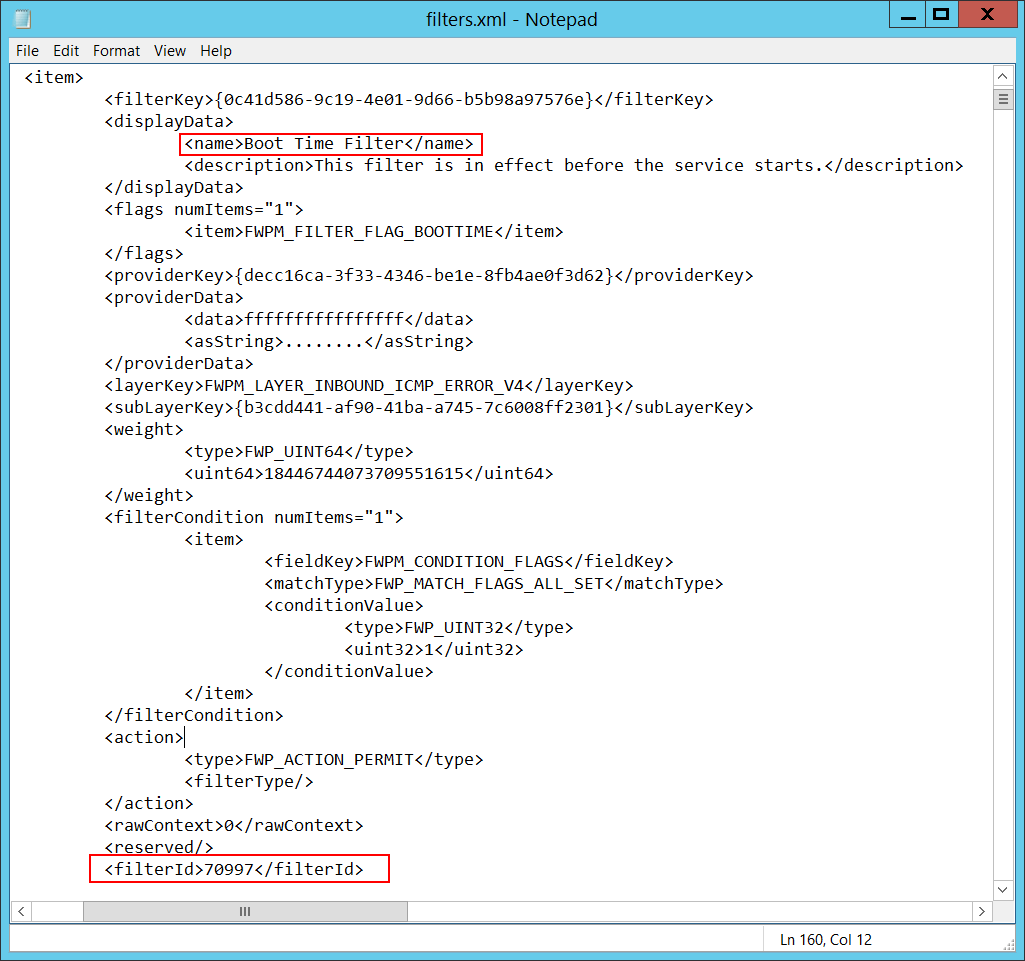
- **Filter Run-Time ID** \[Type = UInt64\]: unique filter ID which blocks the application from binding to the port. By default, Windows firewall won't prevent a port from binding by an application, and if this application doesn’t match any filters, you will get value 0 in this field.
To find specific Windows Filtering Platform filter by ID you need to execute the following command: **netsh wfp show filters**. As a result of this command, **filters.xml** file will be generated. You need to open this file and find the specific substring with the required filter ID (**<filterId>**)**,** for example:
**Network Information:**
- **Source Address** \[Type = UnicodeString\]**:** the local IP address of the computer running the application.
- IPv4 Address
- IPv6 Address
- :: - all IP addresses in IPv6 format
- 0.0.0.0 - all IP addresses in IPv4 format
- 127.0.0.1 , ::1 - localhost
- **Source Port** \[Type = UnicodeString\]**:** the port number used by the application.
- **Protocol** \[Type = UInt32\]: the protocol number being used.
| Service | Protocol Number |
|----------------------------------------------------|-----------------|
| Internet Control Message Protocol (ICMP) | 1 |
| Transmission Control Protocol (TCP) | 6 |
| User Datagram Protocol (UDP) | 17 |
| General Routing Encapsulation (PPTP data over GRE) | 47 |
| Authentication Header (AH) IPSec | 51 |
| Encapsulation Security Payload (ESP) IPSec | 50 |
| Exterior Gateway Protocol (EGP) | 8 |
| Gateway-Gateway Protocol (GGP) | 3 |
| Host Monitoring Protocol (HMP) | 20 |
| Internet Group Management Protocol (IGMP) | 88 |
| MIT Remote Virtual Disk (RVD) | 66 |
| OSPF Open Shortest Path First | 89 |
| PARC Universal Packet Protocol (PUP) | 12 |
| Reliable Datagram Protocol (RDP) | 27 |
| Reservation Protocol (RSVP) QoS | 46 |
**Filter Information:**
- **Filter Run-Time ID** \[Type = UInt64\]: unique filter ID which blocks the application from binding to the port. By default, Windows firewall won't prevent a port from binding by an application, and if this application doesn’t match any filters, you will get value 0 in this field.
To find specific Windows Filtering Platform filter by ID you need to execute the following command: **netsh wfp show filters**. As a result of this command, **filters.xml** file will be generated. You need to open this file and find the specific substring with the required filter ID (**<filterId>**)**,** for example:
 - **Layer Name** \[Type = UnicodeString\]: [Application Layer Enforcement](https://msdn.microsoft.com/library/windows/desktop/aa363971(v=vs.85).aspx) layer name.
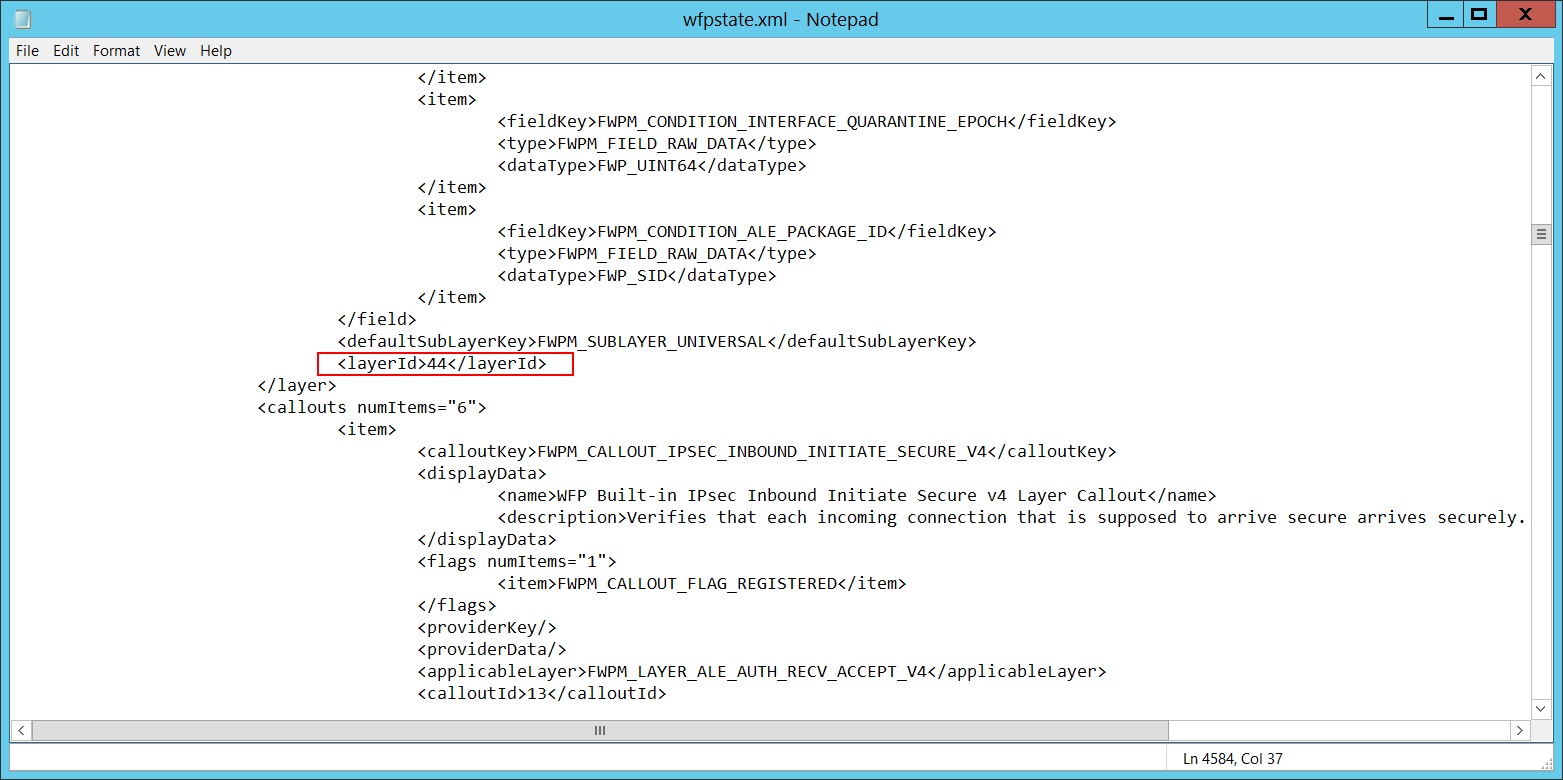
- **Layer Run-Time ID** \[Type = UInt64\]: Windows Filtering Platform layer identifier. To find specific Windows Filtering Platform layer ID you need to execute the following command: **netsh wfp show state**. As result of this command **wfpstate.xml** file will be generated. You need to open this file and find specific substring with required layer ID (**<layerId>**)**,** for example:
- **Layer Name** \[Type = UnicodeString\]: [Application Layer Enforcement](https://msdn.microsoft.com/library/windows/desktop/aa363971(v=vs.85).aspx) layer name.
- **Layer Run-Time ID** \[Type = UInt64\]: Windows Filtering Platform layer identifier. To find specific Windows Filtering Platform layer ID you need to execute the following command: **netsh wfp show state**. As result of this command **wfpstate.xml** file will be generated. You need to open this file and find specific substring with required layer ID (**<layerId>**)**,** for example:
 ## Security Monitoring Recommendations
- There is no recommendation for this event in this document.
## Security Monitoring Recommendations
- There is no recommendation for this event in this document.