---
title: Get machines onboarded to Microsoft Defender ATP
description: Track onboarding of Intune-managed machines to Windows Defender ATP and increase onboarding rate.
keywords: onboard, Intune management, MDATP, WDATP, Microsoft Defender, Windows Defender, advanced threat protection, configuration management
search.product: eADQiWindows 10XVcnh
search.appverid: met150
ms.prod: w10
ms.mktglfcycl: deploy
ms.sitesec: library
ms.pagetype: security
ms.author: lomayor
author: lomayor
ms.localizationpriority: medium
manager: dansimp
audience: ITPro
ms.collection: M365-security-compliance
ms.topic: article
---
# Get machines onboarded to Microsoft Defender ATP
**Applies to:**
- [Microsoft Defender Advanced Threat Protection (Microsoft Defender ATP)](https://go.microsoft.com/fwlink/p/?linkid=2069559)
>Want to experience Microsoft Defender ATP? [Sign up for a free trial.](https://www.microsoft.com/microsoft-365/windows/microsoft-defender-atp?ocid=docs-wdatp-onboardconfigure-abovefoldlink)
Each onboarded machine adds an additional endpoint detection and response (EDR) sensor and increases visibility over breach activity in your network. Onboarding also ensures that a machine can be checked for vulnerable components as well security configuration issues and can receive critical remediation actions during attacks.
Before you can track and manage onboarding of machines:
- [Enroll your machines to Intune management](configure-machines.md#enroll-machines-to-intune-management)
- [Ensure you have the necessary permissions](configure-machines.md#obtain-required-permissions)
## Discover and track unprotected machines
The **Onboarding** card provides a high-level overview of your onboarding rate by comparing the number of Windows 10 machines that have actually onboarded to Microsoft Defender ATP against the total number of Intune-managed Windows 10 machines.
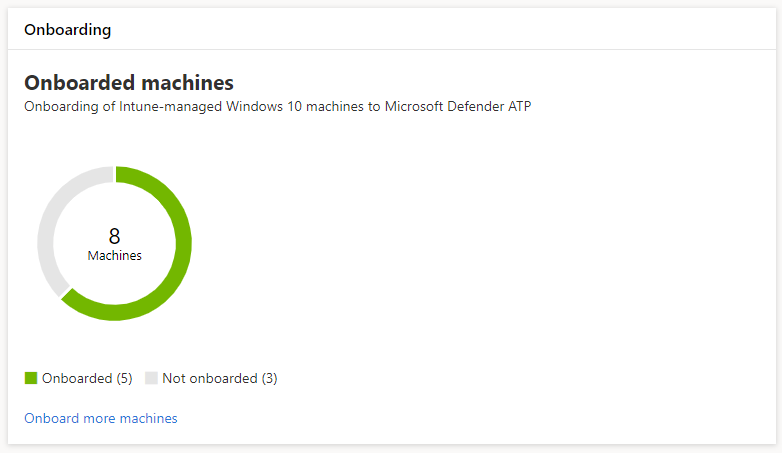
*Card showing onboarded machines compared to the total number of Intune-managed Windows 10 machine*
>[!NOTE]
>If you used Security Center Configuration Manager, the onboarding script, or other onboarding methods that don’t use Intune profiles, you might encounter data discrepancies. To resolve these discrepancies, create a corresponding Intune configuration profile for Microsoft Defender ATP onboarding and assign that profile to your machines.
## Onboard more machines with Intune profiles
Microsoft Defender ATP provides several convenient options for [onboarding Windows 10 machines](onboard-configure.md). For Intune-managed machines, however, you can leverage Intune profiles to conveniently deploy the Microsoft Defender ATP sensor to select machines, effectively onboarding these devices to the service.
From the **Onboarding** card, select **Onboard more machines** to create and assign a profile on Intune. The link takes you to the device compliance page on Intune, which provides a similar overview of your onboarding state.
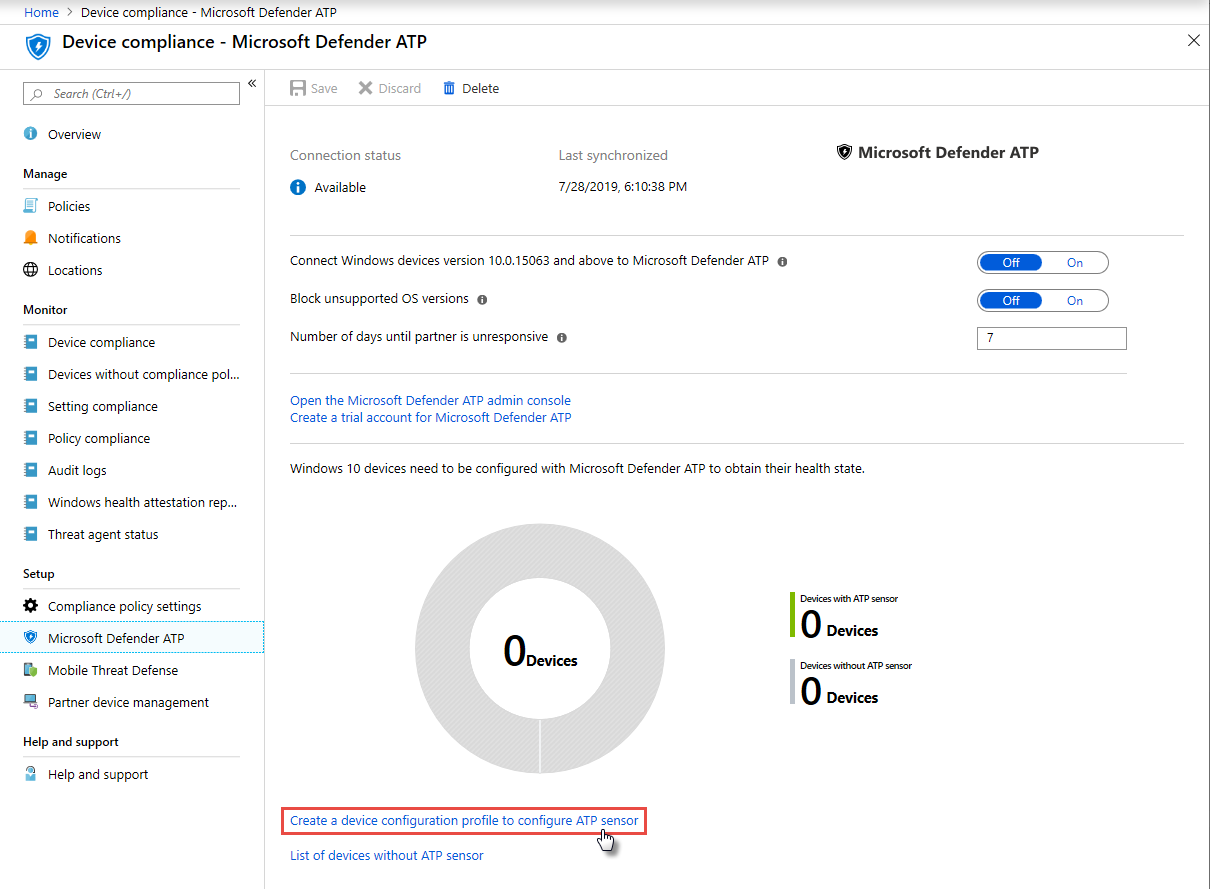
*Microsoft Defender ATP device compliance page on Intune device management*
>[!TIP]
>Alternatively, you can navigate to the Microsoft Defender ATP onboarding compliance page in the [Microsoft Azure portal](https://portal.azure.com/) from **All services > Intune > Device compliance > Microsoft Defender ATP**.
From the device compliance page, create a configuration profile specifically for the deployment of the Microsoft Defender ATP sensor and assign that profile to the machines you want to onboard. To do this, you can either:
- Select **Create a device configuration profile to configure ATP sensor** to start with a predefined device configuration profile.
- Create the device configuration profile from scratch.
For more information, [read about using Intune device configuration profiles to onboard machines to Microsoft Defender ATP](https://docs.microsoft.com/intune/advanced-threat-protection#onboard-devices-by-using-a-configuration-profile).
>Want to experience Microsoft Defender ATP? [Sign up for a free trial.](https://www.microsoft.com/microsoft-365/windows/microsoft-defender-atp?ocid=docs-wdatp-onboardconfigure-belowfoldlink)
# Related topics
- [Ensure your machines are configured properly](configure-machines.md)
- [Increase compliance to the Microsoft Defender ATP security baseline](configure-machines-security-baseline.md)
- [Optimize ASR rule deployment and detections](configure-machines-asr.md)