---
title: Microsoft Threat Experts
ms.reviewer:
description: Microsoft Threat Experts is the new managed detection and response (MDR) service in Microsoft Defender Advanced Threat Protection (Microsoft Defender ATP) that provides proactive hunting, prioritization, and additional context and insights that further empower security operations centers (SOCs) to identify and respond to threats quickly and accurately. It provides additional layer of expertise and optics that Microsoft customers can utilize to augment security operation capabilities as part of Microsoft 365.
keywords: managed threat hunting service, managed threat hunting, managed detection and response (MDR) service, MTE, Microsoft Threat Experts
search.product: Windows 10
search.appverid: met150
ms.prod: w10
ms.mktglfcycl: deploy
ms.sitesec: library
ms.pagetype: security
ms.author: macapara
author: mjcaparas
ms.localizationpriority: medium
manager: dansimp
audience: ITPro
ms.collection: M365-security-compliance
ms.topic: conceptual
---
# Microsoft Threat Experts
**Applies to:**
- [Microsoft Defender Advanced Threat Protection (Microsoft Defender ATP)](https://go.microsoft.com/fwlink/p/?linkid=2069559)
[!include[Prerelease information](prerelease.md)]
Microsoft Threat Experts is a managed detection and response (MDR) service that provides Security Operation Centers (SOCs) with expert level monitoring and analysis to help them ensure that critical threats in their unique environments don’t get missed.
This new capability provides expert-driven insights and data through targeted attack notification and access to experts on demand.
## Targeted attack notification
Microsoft Threat Experts provides proactive hunting for the most important threats to your network, including human adversary intrusions, hands-on-keyboard attacks, or advanced attacks like cyberespionage. The managed hunting service includes:
- Threat monitoring and analysis, reducing dwell time and risk to the business
- Hunter-trained artificial intelligence to discover and prioritize both known and unknown attacks
- Identifying the most important risks, helping SOCs maximize time and energy
- Scope of compromise and as much context as can be quickly delivered to enable fast SOC response.
## Collaborate with experts, on demand
>[!NOTE]
>The Microsoft Threat Experts' experts-on-demand capability is still in preview. You can only use the experts-on-demand capability if you have applied for preview and your application has been approved.
Customers can engage our security experts directly from within Microsoft Defender Security Center for timely and accurate response. Experts provide insights needed to better understand the complex threats affecting your organization, from alert inquiries, potentially compromised machines, root cause of a suspicious network connection, to additional threat intelligence regarding ongoing advanced persistent threat campaigns. With this capability, you can:
- Get additional clarification on alerts including root cause or scope of the incident
- Gain clarity into suspicious machine behavior and next steps if faced with an advanced attacker
- Determine risk and protection regarding threat actors, campaigns, or emerging attacker techniques
- Seamlessly transition to Microsoft Incident Response (IR) or other third-party Incident Response services when necessary
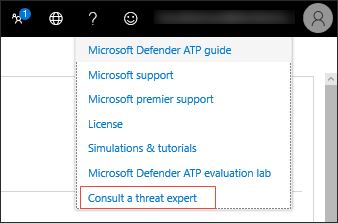
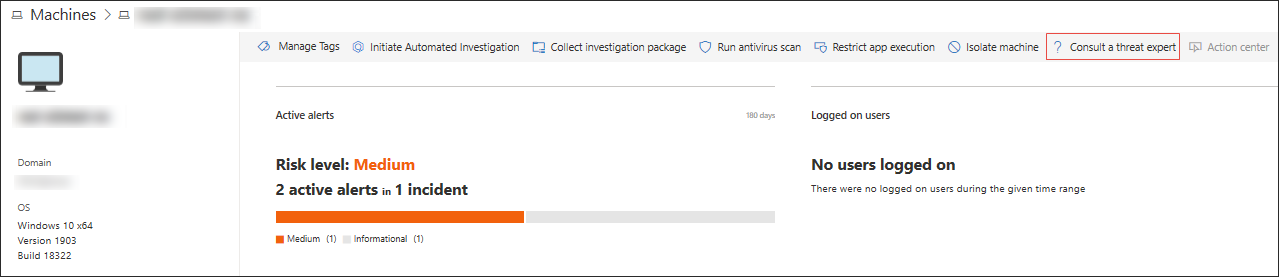
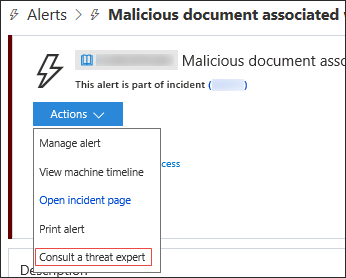
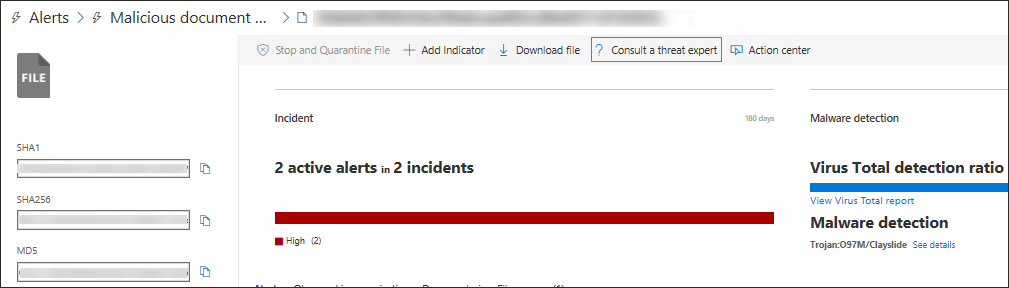
The option to **Consult a threat expert** is available in several places in the portal so you can engage with experts in the context of your investigation:
- **Help and support menu**
- **Machine page actions menu**
- **Alerts page actions menu**
- **File page actions menu**
## Related topic
- [Configure Microsoft Threat Experts capabilities](configure-microsoft-threat-experts.md)