The following table lists the supported MP4 container metadata key names in FFmpeg (see the second column). It’s also worth checking out this comparison of video container formats.
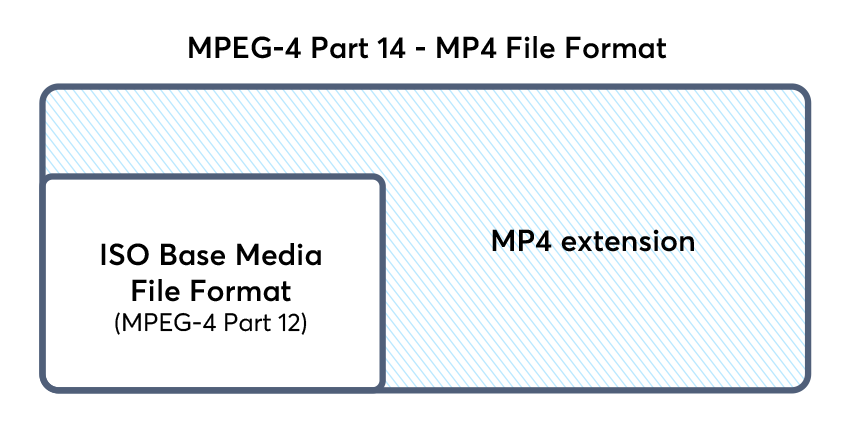
The MP4 file format is an extension of the ISO base media file format (ISOBMFF), and as such applications (ie: Jellyfin) sometimes state the container type as mov instead of mp4.
| Element | FFmpeg Metadata Key | Description |
|---|---|---|
| Title | title | The title of this video. (String) |
| Year | date | The date of production. Please note that the ffmpeg documentation is totally wrong here, there is no key named year, but only date. (String) |
| Copyright | copyright | The copyright of your video. (String) |
| Artist | artist | The name of the (video) artist. Please don’t use this element for the composer, as there is a dedicated element especially for the composer, see below. (String) |
| Album Artist | album_artist | The name of the album artist: this may be a guest artist or a featured artist. This element can also be left out or be the same name as the artist. (String) |
| Author | author | The author of the video. (String) |
| Composer | composer | The name of the composer. (String) |
| Album | album | The title or the name of this album. (String) |
| Description | comment | A (content) description of this video. For a synopsis, please see the separate element instead. (String) |
| Synopsis | synopsis | A synopsis, a longer description of this video. (String) |
| Genre | genre | The genre this video belongs to. (String) |
| Make | make | (String) |
| Model | model | (String) |
| Location | location | (String) |
| Grouping | grouping | The name of a group of videos somehow belonging together. In contrast to the album elment, grouping happens inside (that is, below) the album level. (String) |
| Show | show | The name of the TV show, if applicable. (String) |
| Episode | episode_id | Either the episode name or episode number, for display. If necessary, use the separate, yet optional episode number element for correct sorting. (String) |
| Eposide (Sorting) | episode_sort | This element is for sorting only, but never displayed. It allows numerical sorting of episode names that are strings, but not (necessarily) numbers. The valid range is limited to 0 to 255 only, so this doesn’t support all those endless telenovas, it seems… (Int8) |
| Season | season_number | The season number, in the range of 0 to 255 only. (Int8) |
| Lyrics | lyrics | Optional lyrics for badly sung sing-along... (String) |
| Compilation | compilation | If 1, then this video file is part of a compilation. 0 otherwise. (Int8) |
| Network | network | (String) |
| Media Type | media_type | (Int8) |
| HD Video | hd_video | (Int8) |
| Gapless Playback | gapless_playback | (Int8) |
| Encoding Tool | encoder | Not available to us users, as it gets automatically set by ffmpeg itself; this is set to the libavformat version string. |
| Encoding Tool | encoding_tool | Not available to us users, as it gets automatically set by ffmpeg itself; this is set to the libavformat version string. |
FFmpeg Examples:
I recommend checking out my full list of FFmpeg examples to give you a head start if you’re not familiar using basic ffmpeg commands.
# Removing/nullifying container-level title metadata key value:
ffmpeg -i <input.mp4> -metadata title= -codec copy <output.mp4>

# Setting video stream metadata key value:
ffmpeg -i <input.mp4> -metadata:s:v:0 title="Movie Name (year)" -codec copy <output.mp4>

# Setting audio stream metadata key value:
ffmpeg -i <input.mp4> -metadata:s:a:0 language=eng -codec copy <output.mp4>

# Setting multiple metadata key values:
ffmpeg -i <input.mp4> -metadata title="Movie Name" -metadata date="$(date -Iseconds)" -metadata:s:a:0 language=eng -codec copy <output.mp4>

# More advanced example using a for loop:
for f in *.mp4; do ffmpeg -loglevel info -hide_banner -y -i "$f" \
-metadata title= -metadata comment="No comment is my comment" \
-metadata:s:a:0 language=eng  -metadata:s:v:0 title= \
-movflags faststart -codec copy "${f/OldName/NewName}"; done
Example FFmpeg command demonstrating setting and removing metadata key values:
# Simple example
ffmpeg -i <input.mp4> -metadata comment="This is the now the value of the comment metadata key" -metadata:s:a:0 language=eng -metadata date="$(date -Iseconds)" -metadata title= -metadata:s:v:0 title= -movflags faststart -codec copy <output.mp4>

# Advanced example using for loop
for f in *.mp4; do ffmpeg -loglevel info -hide_banner -y -i "$f" -metadata comment="This is the now the value of the comment metadata key" -metadata:s:a:0 language=eng -metadata date="$(date -Iseconds)" -metadata title= -metadata:s:v:0 title= -movflags faststart -codec copy directory/"$f"; done
What is MP4?
MP4 is a multimedia file storage format used for storing video. MP4 is widely used and works with a vast range of devices. Technically, an MP4 is a digital container file, which means it contains compressed video data and other associated data necessary for playing the video, but the MP4 is only a wrapper around the video, not the video itself.
MPEG-4 Part 14 (MP4) follows a stricter metadata key naming standard than other related media container types such as Matroska (MKV). FFmpeg’s Matroska muxer also accepts free-form user created key/value metadata pairs. You are not able to create your own metadata key names in MP4 containers.
MP4 files are typically more compressed and thus smaller than other video file types. The video content within MP4 files is encoded with MPEG-4, a common encoding standard.
What is a digital container file?
A digital container file (not to be confused with container computing) is a wrapper for data and metadata that belong together. Think of it as a filing cabinet, with different digital container formats (such as MOV or MP4) representing filing cabinets of different sizes that organize their files in different ways.
For instance, a typical MP4 file contains video tracks, audio tracks, and metadata about both. “Metadata” is information about the data that helps computers find the right data – just as a library card catalog offers information about a book but is not the book itself. It can also contain images and subtitles.
If you have any questions/comments regarding this article, click here or scroll down below (login isn't required to post comments and there's no waiting period).
 Travis Runyard
 Travis Runyard
 Travis Runyard