

Gogh: The Best Color Schemes for Your Terminal
Gogh provides Color Schemes For Ubuntu, Linux Mint, Elementary OS and all distributions that use Gnome Terminal, Pantheon Terminal, Tilix, or XFCE4 Terminal; initially inspired by Elementary OS Luna. Also works on iTerm for macOS.
📦 Install
Linux:
bash -c "$(wget -qO- https://git.io/vQgMr)"
Mac:
bash -c "$(curl -sLo- https://git.io/vQgMr)"
VMware: Enable Inter-VM Transparent Page Sharing (v5+)
If you’re using VMWare ESXi in a non-production environment, such as a home lab, consider changing the advanced host setting `Mem. ShareForceSalting` to “0” in order to encourage likeliness of the hypervisor to increase the inter-VM page sharing pool. After doing so, the PSHARE on my host increased from about 3GB to 4.5GB with 3767MB savings (esxtop then press m).
PMEM /MB: 32672 total: 1636 vmk,28639 other, 2397 free
VMKMEM/MB: 32510 managed: 939 minfree, 15602 rsvd, 16907 ursvd, clear state
PSHARE/MB: 4541 shared, 788 common: 3753 saving
SWAP /MB: 0 curr, 0 rclmtgt: 0.00 r/s, 0.00 w/s
ZIP /MB: 0 zipped, 0 saved
MEMCTL/MB: 0 curr, 0 target, 12773 max
The concept of salting has been introduced to help address concerns system administrators may have over the security implications of TPS as described in KB Security considerations and disallowing inter-Virtual Machine Transparent Page Sharing (2080735). Salting is used to allow more granular management of the virtual machines participating in TPS than was previously possible. As per the original TPS implementation, multiple virtual machines could share pages when the contents of the pages were same. With the new salting settings, the virtual machines can share pages only if the salt value and contents of the pages are identical. A new host config option Mem.ShareForceSalting is introduced to enable or disable salting.
By default, salting is enabled after the ESXi update releases mentioned above are deployed, (Mem.ShareForceSalting=2) and each virtual machine has a different salt. This means page sharing does not occur across the virtual machines (inter-VM TPS) and only happens inside a virtual machine (intra VM).
When salting is enabled (Mem.ShareForceSalting=1 or 2) in order to share a page between two virtual machines both salt and the content of the page must be same. A salt value is a configurable vmx option for each virtual machine. You can manually specify the salt values in the virtual machine’s vmx file with the new vmx option sched.mem.pshare.salt. If this option is not present in the virtual machine’s vmx file, then the value of vc.uuid vmx option is taken as the default value. Since the vc.uuid is unique to each virtual machine, by default TPS happens only among the pages belonging to a particular virtual machine (Intra-VM).
If a group of virtual machines are considered trustworthy, it is possible to share pages among them by setting a common salt value for all those virtual machines (inter-VM).
The following table shows how different settings for TPS are used together to effect how TPS operates for individual virtual machines:
| Mem. ShareForceSalting (host setting) | sched.mem.pshare.salt (per VM setting) | vc.uuid (per VM setting) | Salt value of VM | TPS between VMs (Inter-VM) | TPS within a VM (Intra-VM) |
|---|---|---|---|---|---|
| 0 | Ignored | Ignored | 0 | Yes, among all VMs on host. | yes |
| 1 | Present | Ignored | sched.mem.pshare.salt | Only among VMs with same salt | yes |
| 1 | Not Present | Ignored | 0 | Yes, among all VMs | yes |
| 2 | Present | Ignored | sched.mem.pshare.salt | Only among VMs with same salt | yes |
| 2 (default) | Not Present (default) | Present (default) | vc.uuid | No inter-VM TPS | yes |
| 2 | Not Present | Not Present | random number | No inter-VM TPS | yes |
For more information on TPS, see:
- For ESXi 5.0 the Sharing Memory Across Virtual Machines section of the vSphere Resource Management guide
- For ESXi 6.5 the Sharing Memory Across Virtual Machines section of the vSphere Resource Management guide
- For ESXi 5.5 – 6.7 the Sharing Memory Across Virtual Machines section of the VMWare vSphere Documentation
- http://blogs.vmware.com/vsphere/2015/01/assess-the-performance-impact-of-the-security-change-in-transparent-page-sharing-behaviour.html
- https://kb.vmware.com/s/article/2097593
Copy/paste and Run Multi-line Shell Scripts
BASH TIP: You can copy/paste multi-line bash/shell scripts directly from sites like this and run them without syntax errors.
Type ( and then paste the contents of your clipboard, and then type ) and press enter.
Chrome Advanced Settings
chrome://flags- The
chrome://flagsURI should be applicable to any chromium-based (ie: Brave, Vivaldi) or chrome browsers - Works on both the desktop and mobile versions
NOTE: For a full list of available advanced chrome settings type in: chrome://aboutFirefox Advanced Settings
about:config- The
about:configURI should be applicable to any firefox or firefox-based browsers - This includes non-Mozilla affiliated browsers such as Tor Browser and LibreWolf (my browser preference is LibreWolf, one of the most open and secure)
- Works on both the desktop and mobile version
NOTE: For a full list of available advanced Firefox settings type in about:aboutGet Public IP address from the Command Line
On a Linux terminal, or Windows with GnuWin32 you can return your public IP address with curl on ipconfig.io (see examples below).
$ curl ipconfig.io
57.110.<redacted>

$ curl ipconfig.io/json
{"ip":"57.110.<redacted>","ip_decimal":<redacted>,"country":"United States","city":"Fremont"}
{
"ip": "<redacted>",
"ip_decimal": <redacted>,
"country": "United States",
"country_iso": "US",
"country_eu": false,
"region_name": "California",
"region_code": "CA",
"metro_code": 803,
"zip_code": "92649",
"city": "Huntington Beach",
"latitude": <redacted>
"longitude": <redacted>,
"time_zone": "America/Los_Angeles",
"asn": "AS<redacted>",
"asn_org": "FRONTIER-FRTR",
"user_agent": {
"product": "Mozilla",
"version": "5.0",
"comment": "(Windows NT 10.0; rv:103.0) Gecko/20100101 Firefox/103.0",
"raw_value": "Mozilla/5.0 (Windows NT 10.0; rv:103.0) Gecko/20100101 Firefox/103.0"
}
}Weather Report in your Terminal
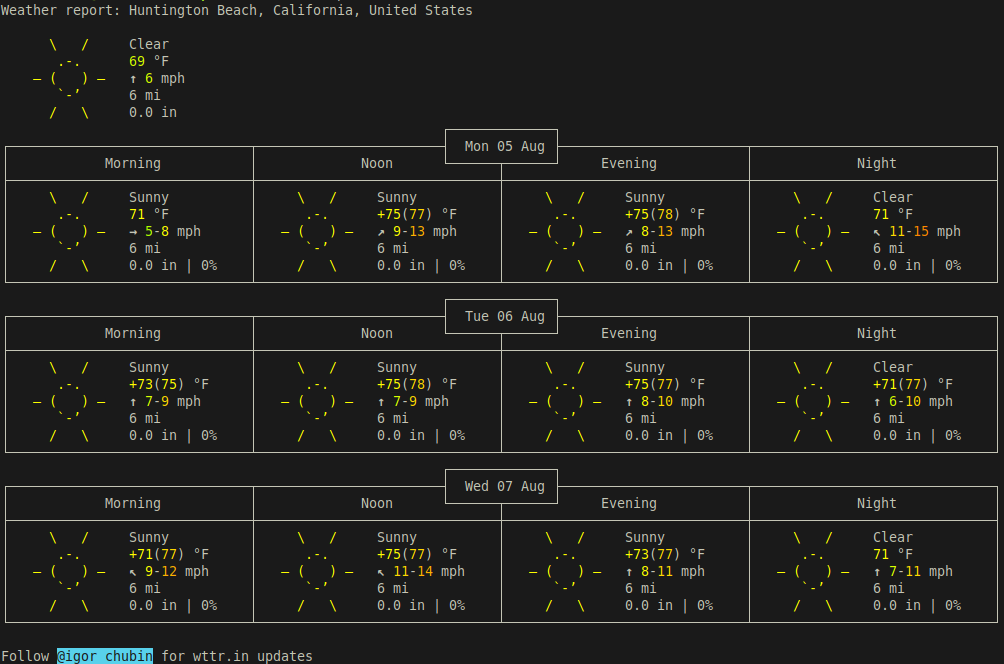
$ curl -4 http://wttr.inBy default the wttr.in application performs a geo IP lookup and outputs weather data for your city or location. To query a different location enter a zip code as the URI (ie: http://wttr.in/28701).
Weather report: Huntington Beach, California, United States

      \   /     Clear
       .-.      69 °F
    ― (   ) ―   ↑ 6 mph
       `-’      6 mi
      /   \     0.0 in
                                                       ┌─────────────┐
┌──────────────────────────────┬───────────────────────┤  Mon 05 Aug ├───────────────────────┬──────────────────────────────┐
│            Morning           │             Noon      └──────┬──────┘     Evening           │             Night            │
├──────────────────────────────┼──────────────────────────────┼──────────────────────────────┼──────────────────────────────┤
│     \   /     Sunny          │     \   /     Sunny          │     \   /     Sunny          │     \   /     Clear          │
│      .-.      71 °F          │      .-.      +75(77) °F     │      .-.      +75(78) °F     │      .-.      71 °F          │
│   ― (   ) ―   → 5-8 mph      │   ― (   ) ―   ↗ 9-13 mph     │   ― (   ) ―   ↗ 8-13 mph     │   ― (   ) ―   ↖ 11-15 mph    │
│      `-’      6 mi           │      `-’      6 mi           │      `-’      6 mi           │      `-’      6 mi           │
│     /   \     0.0 in | 0%    │     /   \     0.0 in | 0%    │     /   \     0.0 in | 0%    │     /   \     0.0 in | 0%    │
└──────────────────────────────┴──────────────────────────────┴──────────────────────────────┴──────────────────────────────┘
                                                       ┌─────────────┐
┌──────────────────────────────┬───────────────────────┤  Tue 06 Aug ├───────────────────────┬──────────────────────────────┐
│            Morning           │             Noon      └──────┬──────┘     Evening           │             Night            │
├──────────────────────────────┼──────────────────────────────┼──────────────────────────────┼──────────────────────────────┤
│     \   /     Sunny          │     \   /     Sunny          │     \   /     Sunny          │     \   /     Clear          │
│      .-.      +73(75) °F     │      .-.      +75(78) °F     │      .-.      +75(77) °F     │      .-.      +71(77) °F     │
│   ― (   ) ―   ↑ 7-9 mph      │   ― (   ) ―   ↑ 7-9 mph      │   ― (   ) ―   ↑ 8-10 mph     │   ― (   ) ―   ↑ 6-10 mph     │
│      `-’      6 mi           │      `-’      6 mi           │      `-’      6 mi           │      `-’      6 mi           │
│     /   \     0.0 in | 0%    │     /   \     0.0 in | 0%    │     /   \     0.0 in | 0%    │     /   \     0.0 in | 0%    │
└──────────────────────────────┴──────────────────────────────┴──────────────────────────────┴──────────────────────────────┘
                                                       ┌─────────────┐
┌──────────────────────────────┬───────────────────────┤  Wed 07 Aug ├───────────────────────┬──────────────────────────────┐
│            Morning           │             Noon      └──────┬──────┘     Evening           │             Night            │
├──────────────────────────────┼──────────────────────────────┼──────────────────────────────┼──────────────────────────────┤
│     \   /     Sunny          │     \   /     Sunny          │     \   /     Sunny          │     \   /     Clear          │
│      .-.      +71(77) °F     │      .-.      +75(77) °F     │      .-.      +73(77) °F     │      .-.      71 °F          │
│   ― (   ) ―   ↖ 9-12 mph     │   ― (   ) ―   ↖ 11-14 mph    │   ― (   ) ―   ↑ 8-11 mph     │   ― (   ) ―   ↑ 7-11 mph     │
│      `-’      6 mi           │      `-’      6 mi           │      `-’      6 mi           │      `-’      6 mi           │
│     /   \     0.0 in | 0%    │     /   \     0.0 in | 0%    │     /   \     0.0 in | 0%    │     /   \     0.0 in | 0%    │
└──────────────────────────────┴──────────────────────────────┴──────────────────────────────┴──────────────────────────────┘
Windows Terminal Interfaces You Won’t Regret
Windows Terminal – The first awesome native Windows terminal that came out of Microsoft. Released May 2019. Note: Windows Terminal requires Windows 10 1903 (build 18362) or later.
Cmder – Portable console emulator for Windows. Cmder is a software package created out of pure frustration over the absence of nice console emulators on Windows. It is based on amazing software, and spiced up with the Monokai color scheme and a custom prompt layout, looking sexy from the start.
SmarTTY – a multi-tabbed SSH client with SCP support for Windows. Time to put Putty to bed.
WSL – The Windows Subsystem for Linux lets developers run a GNU/Linux environment — including most command-line tools, utilities, and applications — directly on Windows, unmodified, without the overhead of a virtual machine. Ubuntu 18.04 or Debian exclusively because it’s the closest you can get to running Linux binaries natively on NT without a virtualization abstraction layer. The primary reason behind using this instead of the other tools is: seamless integration. When administering Linux servers, it helps to be using a Linux-based client even though an OpenSSH client binary exists for NT.
Wordpress NGINX Permalink Rewrite
Change the WordPress permalink structure URI with NGINX rewrite:
*/year/month/day/canonical*>*/canonical*
rewrite "/([0-9]{4})/([0-9]{2})/([0-9]{2})/(.*)" $scheme://$server_name/$4 permanent;
*/year/month/canonical*>*/canonical*
rewrite "/([0-9]{4})/([0-9]{2})/(.*)" $scheme://$server_name/$3 permanent;