

Follow these instructions in order to disable Tor Browser letterboxing only if you understand the implications of doing so and are willing to accept the potential risks:
- In the Tor Browser address bar enter the address:
about:config

- Click the button Accept the Risk and Continue

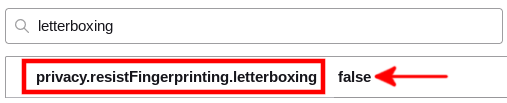
- In the top search field, search for
letterboxing - Toggle this option to false for the name
privacy.resistFingerprinting. letterboxing
If you have any questions/comments regarding this article, click here or scroll down below (login isn't required to post comments and there's no waiting period).
