
If you are experiencing the issue of missing all or most of the Jellyfin Cast & Crew images which do not load until after you click on them, this post may help.
Since there may be multiple issues pertaining to the Cast & Crew images, this post is specifically targeted at the issue where the Cast/Crew images do not display on the media details page until after you click on it.
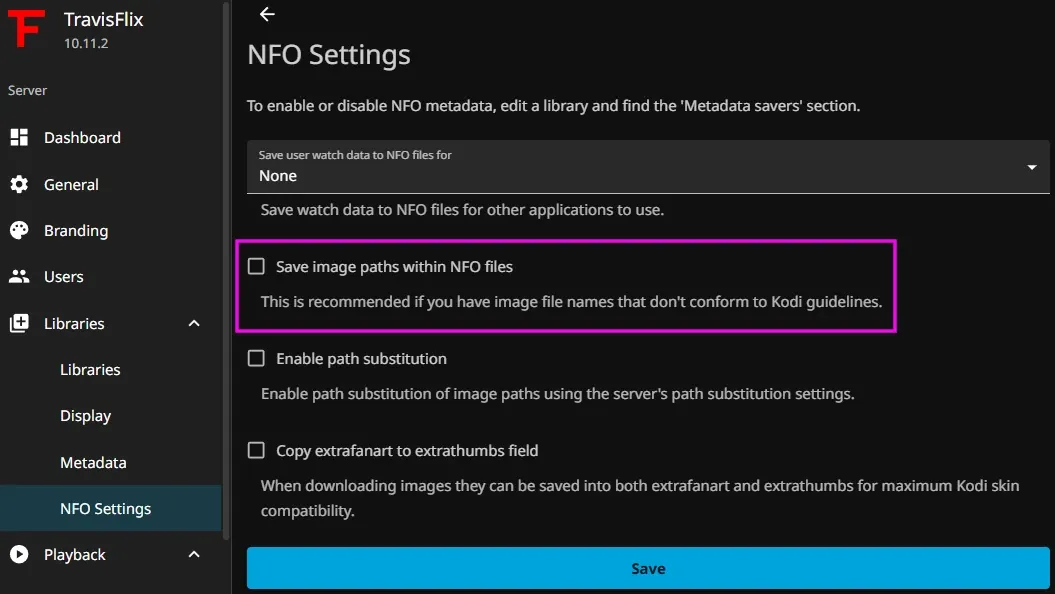
Check Your NFO Settings
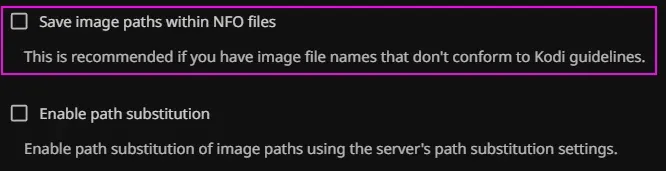
Under Dashboard > NFO Settings, make sure the option Save image paths within NFO files is unchecked. After you make this change you should restart your Jellyfin server to be on the safe side.
Proceed to the next section to run a script which will query Jellyfin for a list of all People data and recursively send a request to a URL that will trigger your Jellyfin server to download only the cast images that are missing.
You can proceed to the next section to either run the PowerShell, Bash or Python version.
Scripts for Recursively Fixing All Missing Cast & Crew Images
These scripts will query Jellyfin for a list of all People data and recursively send a request to the API that will trigger your Jellyfin server to download only the cast images that are missing.
You have a choice of scripting languages to choose from. I recommend the PowerShell Script directly below this text since that's the one I used in order to fix my own missing cast images. I have taken a look at the Shell Scipts and Python Script scripts and believe they will perform the same function.
PowerShell Script - gist
source: https://github.com/jellyfin/jellyfin/issues/8103#issuecomment-2254132859
<#

Source: https://github.com/jellyfin/jellyfin/issues/8103#issuecomment-2254132859

Instructions are below, then fill in the 3 variables below.
If you connect to your server without using a port number, remove :8096 from the $Jellyfin_Server variable.

$Jellyfin_Server: This is the hostname or IP address of your jellyfin server.
$Jellyfin_ApiKey: Create a new API Key for use in this script by going to the Dashboard > API Keys > New API Key button, enter any name, then copy the generated API Key.
$Jellyfin_UserId: This can be retrieved by going to the Dashboard > Users, then click on a user account you want to use with this script, then copy what is in the URL after "userId="

#>

##### VARIABLES #####
$Jellyfin_Server="HostNameOrIPAddress:8096"
$Jellyfin_ApiKey="APIKeyGoesHere"
$Jellyfin_UserId="UserIdGoesHere"


Write-Host "Please wait, the progress bar will appear soon."
$actors = (Invoke-RestMethod -Uri "http://${Jellyfin_Server}/emby/Persons?api_key=${Jellyfin_ApiKey}").Items | Where-Object { [string]::IsNullOrEmpty($_.ImageTags) } | Sort-Object -Property Id -Unique
$numberOfActors = $actors.Count
$count=0
Clear-Host
$actors | ForEach-Object {
	$percentComplete = $count / $numberOfActors * 100
	$roundedPercent = [math]::Round($percentComplete)
	Write-Progress -Activity "Downloading actors photos in progress" -Status "$count actors completed out of $numberOfActors. $roundedPercent% complete:" -PercentComplete $percentComplete
	$null = Invoke-RestMethod -Uri "http://${Jellyfin_Server}/Users/${Jellyfin_UserId}/Items/$($_.Id)?api_key=${Jellyfin_ApiKey}"
	$count++
}
Shell Script #1 - gist
source: https://github.com/nagug/Jellyfin-Actor-Refresh-Script
#!/bin/bash

# API endpoint and your API key
# api_url="http://172.16.16.11:8096/emby" (dont forget the "/emby".. even though you use Jellyfin)
# api_key="xaxajsklujkjaskjaklsjokajss"
# user_id="kjkhkjahdjhsakjdhsakjdhkasd"

api_url="http://server-ip:8096/emby"
api_key=""
user_id=""

server_ip=$(echo "$api_url" | sed -E 's#^https?://([^:/]+).*$#\1#')

# --- ANSI escape codes for colors ---
RED='\033[0;31m'
GREEN='\033[0;32m'
YELLOW='\033[0;33m'
NC='\033[0m' # No Color

# --- Check for force flag ---
force_flag=false
if [[ "$1" == "--force" ]]; then
  force_flag=true
fi

# --- Check server ping ---
if ping -c 1 "$server_ip" > /dev/null 2>&1; then
  echo -e "${GREEN}✔ Server is reachable.${NC}"
else
  echo -e "${RED}✘ Server is not reachable. Exiting.${NC}"
  exit 1
fi

# --- Fetch person data ---
person_data=$(curl -s -w "\n%{http_code}" "$api_url/Persons?api_key=$api_key")
status_code=$(echo "$person_data" | tail -n 1)
person_data=$(echo "$person_data" | sed '$d')

if [[ "$status_code" == "200" ]]; then
  echo -e "${GREEN}✔ Successfully retrieved person data.${NC}"
else
  echo -e "${RED}✘ Failed to retrieve person data. Server response code: $status_code${NC}"
  exit 1
fi

# --- Count the total number of persons ---
total_persons=$(echo "$person_data" | jq -r '.Items | length')
echo -e "Total number of persons: ${YELLOW}$total_persons${NC}"

# --- Process persons based on force flag ---
if [[ "$force_flag" == true ]]; then
  echo "Processing all persons (force flag enabled)."
  jq_expression='.Items[] | .Id'  # Process all persons
else
  echo "Processing only persons without ImageTags."
  jq_expression='.Items[] | select(.ImageTags == null) | .Id'  # Filter for those without ImageTags
fi

# --- Get the count of persons to be processed ---
persons_to_process=$(echo "$person_data" | jq -r "$jq_expression" | wc -l)

# --- Progress bar function ---
show_progress_bar() {
  local current=$1
  local total=$2
  local bar_length=50
  local filled_length=$((($current * $bar_length) / $total))
  local remaining_length=$((bar_length - filled_length))
  local bar=$(printf "%${filled_length}s" '' | tr ' ' '=')
  local remaining=$(printf "%${remaining_length}s" '' | tr ' ' '-')
  local color=$3  # Color for the progress bar
  printf "\r${color}Progress:${NC} [%s%s] %d/%d" "$bar" "$remaining" "$current" "$total"
}

# --- Process each person ID  ---
if [[ "$persons_to_process" -gt 0 ]]; then
  current_person=0
  consecutive_errors=0
  echo "$person_data" | jq -r "$jq_expression" | while read -r person_id; do
    response=$(curl -s -w "\n%{http_code}" "$api_url/Users/$user_id/Items/$person_id?api_key=$api_key")
    person_details=$(echo "$response" | sed '$d')
    status_code=$(echo "$response" | tail -n 1)

    if [[ "$status_code" == "200" ]]; then
      ((current_person++))
      consecutive_errors=0
      show_progress_bar "$current_person" "$persons_to_process" "$GREEN"
    else
      ((consecutive_errors++))
      show_progress_bar "$current_person" "$persons_to_process" "$RED"
      echo -e "\n${RED}✘ Error processing person ID '$person_id'. Server response code: $status_code${NC}"
      if [[ "$consecutive_errors" -ge 10 ]]; then
        echo -e "${RED}✘ Too many consecutive errors. Stopping.${NC}"
        exit 1
      fi
    fi
  done
  printf "\n" # Print a newline after the progress bar
else
  if [[ "$force_flag" == true ]]; then
    echo "No persons found." # If --force is used and no persons are found
  else
    echo "No persons found without ImageTags."
  fi
fi
Shell Script #2 - gist
#!/bin/bash

API_KEY="ajksjdijaskdjaiksjdkajsd"
BASE_URL="https://jellyfin.example.com"
USER="theUsernameYouLogInWith"
#Go to https://jellyfin.example.com/web/#/dashboard/users and "rightclick > copy link" on your portrait to get your user ID
USERID="31fd53576d384b288d055549dad87a4a"

# Fetch all persons
response=$(curl -s "${BASE_URL}/emby/Persons?api_key=${API_KEY}")

# Filter persons with empty ImageTags, sort by Id, and remove duplicates
ids=$(echo "$response" | jq -r '.Items[] | select(.ImageTags == null or .ImageTags == {}) | .Id' | sort -u)

# Fetch details for each person
for id in $ids; do
    curl -s "${BASE_URL}/Users/${USERID}/Items/${id}?api_key=${API_KEY}"
done
Python Script - gist
source: https://github.com/SwaggyMacro/jellyfin-actor-processor
import argparse
import shutil
import sys
import time
from typing import Optional, Dict, List
from concurrent.futures import ThreadPoolExecutor, as_completed

import requests

TERMINAL_WIDTH = shutil.get_terminal_size().columns

# ANSI Color codes
GREEN = '\033[92m'
RED = '\033[91m'
YELLOW = '\033[93m'
BLUE = '\033[94m'
RESET = '\033[0m'

class ActorProcessor:
    def __init__(self, api_url: str, api_key: str, max_retries: int = 3, max_workers: int = 10):
        """Initialize the ActorProcessor with API credentials."""
        self.api_url = api_url.rstrip('/')
        if not self.api_url.endswith('/emby'):
            self.api_url += '/emby'
        self.api_key = api_key
        self.session = requests.Session()
        self.user_ids = self.get_uids()
        self.user_id = self.user_ids[0] if self.user_ids else None
        self.max_retries = max_retries
        self.max_workers = max_workers

        if not self.user_id:
            print(f"{RED}✗{RESET} No user IDs found.")
            sys.exit(1)

    def get_uids(self) -> List[str]:
        """Retrieve user IDs from the server."""
        user_ids = []
        us = requests.get(f"{self.api_url}/Users?api_key={self.api_key}").json()
        for u in us:
            user_ids.append(u["Id"])
        return user_ids

    def calculate_speed(self, content_length: int, response_time: float) -> str:
        """Calculate and format network speed."""
        if response_time == 0:
            return f"{RED}N/A{RESET}"
        speed_mbps = (content_length * 8) / (response_time / 1000) / 1_000_000
        color = GREEN if speed_mbps > 10 else YELLOW if speed_mbps > 5 else RED
        return f"{color}{speed_mbps:.2f} Mbps{RESET}"

    def check_server_connectivity(self) -> bool:
        """Check if the server is reachable using requests."""
        try:
            start_time = time.time()
            response = self.session.get(
                f"{self.api_url}/System/Info/Public",
                timeout=11
            )
            response_time = (time.time() - start_time) * 1000
            speed = self.calculate_speed(len(response.content), response_time)

            if response.status_code == 200:
                print(f"{GREEN}✓{RESET} Server is reachable (Response time: {BLUE}{response_time:.2f}ms{RESET}, Speed: {speed})")
                return True
            else:
                print(f"{RED}✗{RESET} Server returned status code {RED}{response.status_code}{RESET}")
                return False
        except requests.exceptions.RequestException as e:
            print(f"{RED}✗{RESET} Connection error: {str(e)}")
            return False

    def fetch_person_data(self, force : bool = False) -> Optional[Dict]:
        """Fetch person data from the jellyfin server."""
        try:
            start_time = time.time()
            response = self.session.get(
                f"{self.api_url}/Persons",
                params={"api_key": self.api_key, "enableImages": "false" if force else "true"},
                timeout=30
            )
            response_time = (time.time() - start_time) * 1000
            speed = self.calculate_speed(len(response.content), response_time)

            response.raise_for_status()
            print(f"\033[K{GREEN}✓{RESET} Retrieved person data (Response time: {BLUE}{response_time:.2f}ms{RESET}, Speed: {speed})")
            return response.json()
        except requests.exceptions.RequestException as e:
            print(f"{RED}✗{RESET} Failed to retrieve person data: {str(e)}")
            return None

    def process_persons(self, force: bool = False):
        """Process persons based on the force flag."""
        person_data = self.fetch_person_data(force)
        if not person_data:
            return

        total_persons = len(person_data.get('Items', []))
        print(f"{BLUE}ℹ{RESET} Total persons: {total_persons}")

        persons_to_process = []
        if force:
            persons_to_process = person_data['Items']
        else:
            persons_to_process = [item for item in person_data['Items']
                                if not item.get('ImageTags')]

        if not persons_to_process:
            print(f"{YELLOW}⚠{RESET} No persons to process.")
            return

        self._process_person_ids(persons_to_process)

    def _process_person_ids(self, persons: List[Dict]):
        """Process each person with progress tracking."""
        total = len(persons)
        with ThreadPoolExecutor(max_workers=self.max_workers) as executor:
            futures = {executor.submit(self._process_person, person, idx, total): person for idx, person in enumerate(persons, 1)}

            for future in as_completed(futures):
                if future.exception():
                    print(f"{RED}✗{RESET} Error processing person: {future.exception()}")

    def _process_person(self, person: Dict, idx: int, total: int):
        """Process a single person with retries."""
        person_id = person['Id']
        person_name = person['Name']
        retry_count = 0
        consecutive_errors = 0

        while retry_count <= self.max_retries:
            try:
                start_time = time.time()
                response = self.session.get(
                    f"{self.api_url.replace('/emby', '')}/Users/{self.user_id}/Items/{person_id}",
                    params={"api_key": self.api_key},
                    timeout=5
                )
                response_time = (time.time() - start_time) * 1000
                speed = self.calculate_speed(len(response.content), response_time)

                status_emoji = f"{GREEN}✓{RESET}" if response.status_code == 200 else f"{RED}✗{RESET}"
                retry_info = f" (Retry {retry_count}/{self.max_retries})" if retry_count > 0 else ""
                status = f"{status_emoji} Processing {idx}/{total} - ID: {BLUE}{person_id}{RESET} - Response time: {response_time:.2f}ms, Speed: {speed}{retry_info} - (Name: {person_name})"

                print(f"\r{' ' * TERMINAL_WIDTH}", end='', flush=True)
                print(f"\r{status}", end='', flush=True)

                if response.status_code == 200:
                    consecutive_errors = 0
                    break
                else:
                    retry_count += 1
                    if retry_count <= self.max_retries:
                        print(f"\n{YELLOW}⚠{RESET} Request failed (Status: {response.status_code}). Retrying ({retry_count}/{self.max_retries})...")
                        time.sleep(0.5)

            except requests.exceptions.RequestException as e:
                retry_count += 1
                if retry_count <= self.max_retries:
                    print(f"\n{YELLOW}⚠{RESET} Request error: {str(e)}. Retrying ({retry_count}/{self.max_retries})...")
                    time.sleep(0.5)
                else:
                    consecutive_errors += 1
                    print(f"\n{RED}✗{RESET} Failed after {self.max_retries} retries: {str(e)}")

        if consecutive_errors >= 10:
            print(f"\n{RED}⚠{RESET} Too many consecutive errors. Stopping.")
            sys.exit(1)

def main():
    parser = argparse.ArgumentParser(description="Jellyfin Actor Processor")
    parser.add_argument("-url", "--url", required=True, help="Jellyfin server URL")
    parser.add_argument("-key", "--api-key", required=True, help="Jellyfin API key")
    parser.add_argument("-f", "--force", action="store_true", help="Process all persons")
    parser.add_argument("-r", "--retries", type=int, default=3, help="Maximum number of retries for failed requests")
    parser.add_argument("-w", "--workers", type=int, default=10, help="Maximum number of parallel workers")
    args = parser.parse_args()

    print(f"{BLUE}ℹ{RESET} Jellyfin Actor Processor")
    print(f"{BLUE}ℹ{RESET} Server URL: {args.url}")
    print(f"{BLUE}ℹ{RESET} API Key: {args.api_key}")
    print(f"{BLUE}ℹ{RESET} Force: {args.force}")
    print(f"{BLUE}ℹ{RESET} Retries: {args.retries}")
    print(f"{BLUE}ℹ{RESET} Workers: {args.workers}")

    processor = ActorProcessor(args.url, args.api_key, args.retries, args.workers)

    if not processor.check_server_connectivity():
        sys.exit(1)

    processor.process_persons(args.force)

if __name__ == "__main__":
    main()
If you have any questions/comments regarding this article, click here or scroll down below (login isn't required to post comments and there's no waiting period).
 Travis Runyard
 Travis Runyard