
Creating a Custom File Renaming Script
This post is specifically about the file renaming scripting feature. It allows you to script your own file renaming operation. Picard provides a very basic and simple file renaming tutorial in their docs site and expects you to develop a script yourself to do anything special. This post goes a tad beyond their tutorial and renames music files according to the following folder/file structure:
[AlbumArtist]/[Year] - [Album]/CD [Disc#]/[Disc#]-[Track#] - [Title]
The brackets [ ] are only shown for read-abililty and they are not part of the folder or file names. Written another way, if you understand regex it would look like this:
(AlbumArtist|Artist)/(Year) - (Album)/(CD [0-9]{1,2}/Disc#-)?(Track#) - (Title)
If the ID3 DISCTOTAL tag is equal to 1 or is missing altogether then the CD # album subfolder is not created and the filename is not prefixed with the disc number and hyphen.
If the ID3 tag has a DISCTOTAL greater than 1 but less than 9, then an album subfolder with the name of CD # (ex. "CD 1" and "CD 2") is created and the filename is prefixed with the disc number.
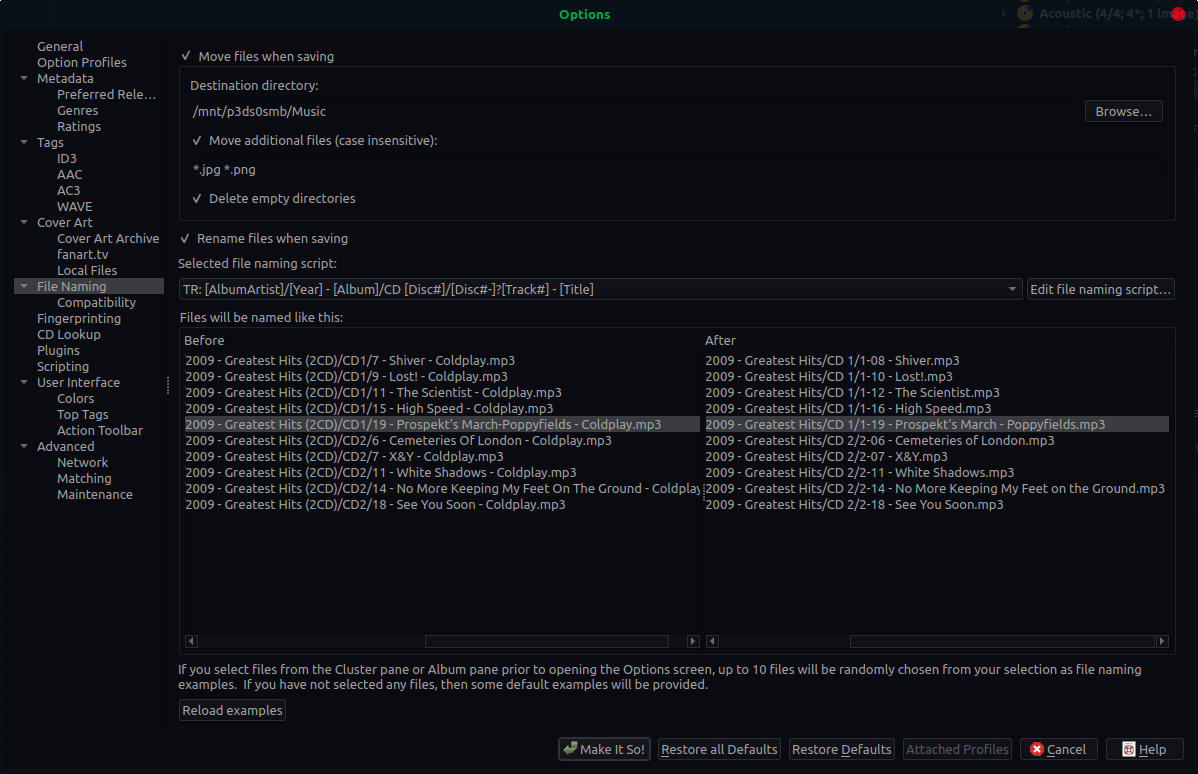
If the ID3 DISCTOTAL is greater than 9, then an album subfolder with the name of CD ## (ex: "CD 10" and "CD 99") is created using a 2-digit integer and the filename is prefixed with the disc number. The image below shows a before and after example.

Custom File Renaming Script Solution
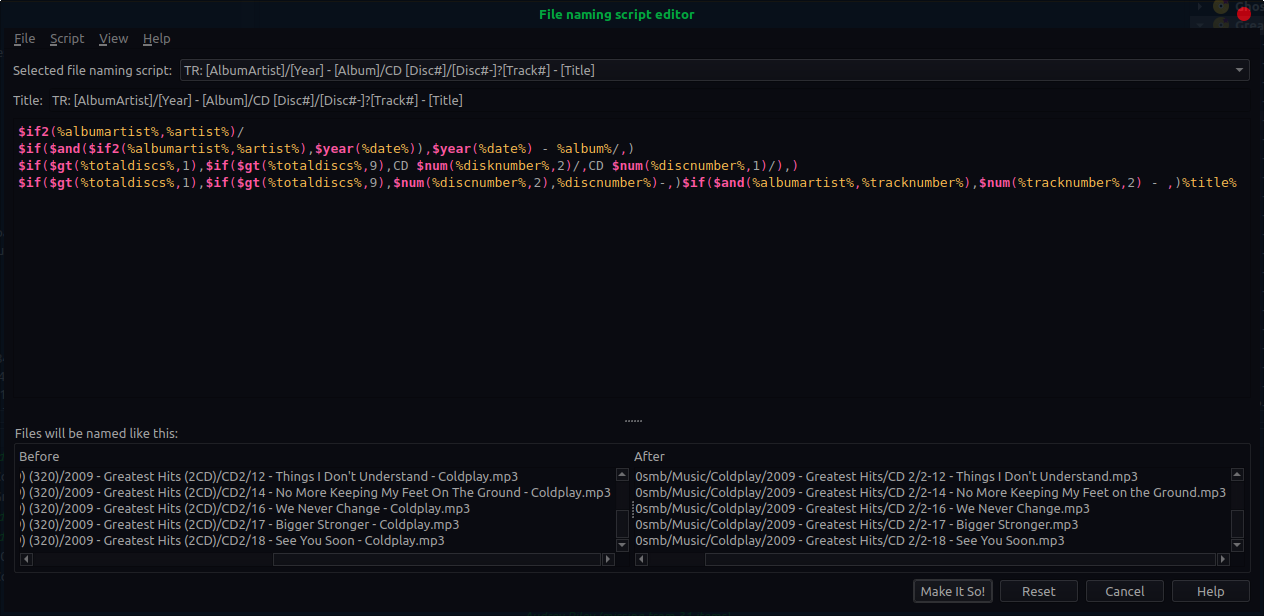
Here is the file renaming script described above:
$if2(%albumartist%,%artist%)/
$if($and($if2(%albumartist%,%artist%),$year(%date%)),$year(%date%) - %album%/,)
$if($gt(%totaldiscs%,1),$if($gt(%totaldiscs%,9),CD $num(%disknumber%,2)/,CD $num(%discnumber%,1)/),)
$if($gt(%totaldiscs%,1),$if($gt(%totaldiscs%,9),$num(%discnumber%,2),%discnumber%)-,)$if($and(%albumartist%,%tracknumber%),$num(%tracknumber%,2) - ,)%title%
If you have any questions, post a comment at the bottom of the page.
Syntax Reference
$add(x,y,…)
Add y to x. Can be used with an arbitrary number of arguments.
Example:
$add(x,y,z) = ((x + y) + z)

$and(x,y,…)
Returns true if both x and y are not empty. Can be used with an arbitrary number of arguments. The result is true if ALL of the arguments are not empty.
$cleanmulti(name)
Removes all empty string elements from the multi-value variable.
Example:
$setmulti(test,one; ; two; three)
$cleanmulti(test)

Result: Sets the value of 'test' to ["one", "two", "three"].
Since Picard 2.8
$copy(new,old)
Copies metadata from variable old to new. The difference between $set(new,%old%) is that $copy(new,old) copies multi-value variables without flattening them.
Since Picard 0.9
$copymerge(new,old[,keep_duplicates])
Merges metadata from variable old into new, removing duplicates and appending to the end, so retaining the original ordering. Like $copy, this will also copy multi-valued variables without flattening them.
If keep_duplicates is set, then the duplicates will not be removed from the result.
Since Picard 1.0
$countryname(country_code,translate="")
Returns the name of the country for the specified country code. If the country code is invalid an empty string will be returned. If translate is not blank, the output will be translated into the current locale language.
$dateformat(date,format="%Y-%m-%d",date_order="ymd")
Returns the input date in the specified format, which is based on the standard Python strftime format codes. If no format is specified the date will be returned in the form 2020-02-05. If the date or format are invalid an empty string will be returned.
The default order for the input date is "ymd".  This can be changed by specifying
either "dmy" or "mdy".

Note: Platform-specific formatting codes should be avoided to help ensure the portability of scripts across the different platforms. These codes include: remove zero-padding (e.g. %-d and %-m on Linux or macOS, and their equivalent %#d and %#m on Windows); element length specifiers (e.g. %3Y); and hanging '%' at the end of the format string.
Since Picard 2.7
$datetime(format="%Y-%m-%d %H:%M:%S")
Returns the current date and time in the specified format, which is based on the standard Python strftime format codes. If no format is specified the date/time will be returned in the form 2020-02-05 14:26:32. Note: Platform-specific formatting codes should be avoided to help ensure the portability of scripts across the different platforms. These codes include: remove zero-padding (e.g. %-d and %-m on Linux or macOS, and their equivalent %#d and %#m on Windows); element length specifiers (e.g. %3Y); and hanging '%' at the end of the format string.
$day(date,date_order="ymd")
Returns the day portion of the specified date. The default order is "ymd". This can be changed by specifying either "dmy" or "mdy". If the date is invalid an empty string will be returned.
Since Picard 2.7
$delete(name)
Unsets the variable name and marks the tag for deletion. This is similar to $unset(name) but also marks the tag for deletion. E.g. running $delete(genre) will actually remove the genre tag from a file when saving.
Since Picard 2.1
$delprefix(text,prefix1,prefix2,…)
Deletes the specified prefixes from the beginning of text. Multiple prefixes can be specified as separate parameters. If no prefix is specified 'A' and 'The' are used by default.
Example:
$delprefix(%albumartist%,A,An,The,La,Le,Les,Un,Une)

Since Picard 1.3
$div(x,y,…)
Divides x by y. Can be used with an arbitrary number of arguments.
Example:
$div(x,y,z) = ((x / y) / z)

$endswith(text,suffix)
Returns true if text ends with suffix.
Since Picard 1.4
$eq(x,y)
Returns true if x equals y.
$eq_all(x,a1,a2,…)
Returns true if x equals a1 and a2 and … Functionally equivalent to $and($eq(x,a1),$eq(x,a2),…).
Example:
$if($eq_all(%albumartist%,%artist%,Justin Bieber),$set(engineer,Meat Loaf))

$eq_any(x,a1,a2,…)
Returns true if x equals a1 or a2 or … Functionally equivalent to $or($eq(x,a1),$eq(x,a2),…). Functionally equivalent to the eq2 plugin.
$find(haystack,needle)
Finds the location of one string within another. Returns the index of the first occurrence of needle in haystack, or "" if needle was not found.
Since Picard 2.3
Note that prior to Picard 2.3.2 $find returned "-1" if needle was not found.
$firstalphachar(text,nonalpha="#")
Returns the first character of text. If text does not begin with an alphabetic character, then nonalpha is returned instead. If nonalpha is not specified, the default value "#" will be used.
Since Picard 0.12
$firstwords(text,length)
Like $truncate() except that it will only return the complete words from text which fit within length characters.
Since Picard 0.12
$foreach(name,code,separator="; ")
Iterates over each element found in the multi-value tag name, executing code. For each loop, the element value is first stored in the tag _loop_value and the count is stored in the tag _loop_count. This allows the element or count value to be accessed within the code script. A literal value representing a multi-value can be substituted for name, using the separator (or "; " if not passed) to coerce the value into a proper multi-valued tag.
$get(name)
Returns the variable name (equivalent to %name%).
$getmulti(name,index,separator="; ")
Gets the element at index from the multi-value tag name. A literal value representing a multi-value can be substituted for name, using the separator (or "; " if not passed) to coerce the value into a proper multi-valued tag.
$gt(x,y[,type])
Returns true if x is greater than y using the comparison specified in type. Possible values of type are "int" (integer), "float" (floating point), "text" (case-sensitive text), "nocase" (case-insensitive text) and "auto" (automatically determine the type of arguments provided), with "auto" used as the default comparison method if type is not specified. The "auto" type will use the first type that applies to both arguments in the following order of preference: "int", "float" and "text".
$gte(x,y[,type])
Returns true if x is greater than or equal to y using the comparison specified in type. Possible values of type are "int" (integer), "float" (floating point), "text" (case-sensitive text), "nocase" (case-insensitive text) and "auto" (automatically determine the type of arguments provided), with "auto" used as the default comparison method if type is not specified. The "auto" type will use the first type that applies to both arguments in the following order of preference: "int", "float" and "text".
$if(if,then,else)
If if is not empty, it returns then, otherwise it returns else.
$if2(a1,a2,a3,…)
Returns first non empty argument.
$in(x,y)
Returns true, if x contains y.
$initials(text)
Returns the first character of each word in text, if it is an alphabetic character.
Since Picard 0.12
$inmulti(%x%,y)
Returns true if multi-value variable x contains exactly y as one of its values.
Since Picard 1.0
$is_audio()
Returns true, if the file processed is an audio file.
Since Picard 2.2
$is_complete()
Returns true if every track in the album is matched to a single file. Only works in File Naming scripts.
$is_multi(name)
Returns '1' if the argument is a multi-value tag and there are more than one elements, otherwise an empty string.
Example:
$is_multi(%artists%)

Result: 1 if there is more than one artist, otherwise "".
Since Picard 2.7
$is_video()
Returns true, if the file processed is an video file.
Since Picard 2.2
$join(name,text,separator="; ")
Joins all elements in name, placing text between each element, and returns the result as a string.
$left(text,number)
Returns the first number characters from text.
$len(text)
Returns the number of characters in text.
$lenmulti(name,separator="; ")
Returns the number of elements in the multi-value tag name. A literal value representing a multi-value can be substituted for name, using the separator (or "; " if not passed) to coerce the value into a proper multi-valued tag.
Example:
$lenmulti(One; Two; Three) = 3

$lower(text)
Returns text in lower case.
$lt(x,y[,type])
Returns true if x is less than y using the comparison specified in type. Possible values of type are "int" (integer), "float" (floating point), "text" (case-sensitive text), "nocase" (case-insensitive text) and "auto" (automatically determine the type of arguments provided), with "auto" used as the default comparison method if type is not specified. The "auto" type will use the first type that applies to both arguments in the following order of preference: "int", "float" and "text".
$lte(x,y[,type])
Returns true if x is less than or equal to y using the comparison specified in type. Possible values of type are "int" (integer), "float" (floating point), "text" (case-sensitive text), "nocase" (case-insensitive text) and "auto" (automatically determine the type of arguments provided), with "auto" used as the default comparison method if type is not specified. The "auto" type will use the first type that applies to both arguments in the following order of preference: "int", "float" and "text".
$map(name,code,separator="; ")
Iterates over each element found in the multi-value tag name and updates the value of the element to the value returned by code, returning the updated multi-value tag. For each loop, the element value is first stored in the tag _loop_value and the count is stored in the tag _loop_count. This allows the element or count value to be accessed within the code script.
Empty elements are automatically removed.
Example:
$map(First:A; Second:B,$upper(%_loop_count%=%_loop_value%))

Result: 1=FIRST:A; 2=SECOND:B
$matchedtracks()
Returns the number of matched tracks within a release. Only works in File Naming scripts.
Since Picard 0.12
$max(type,x,…)
Returns the maximum value using the comparison specified in type.
Possible values of type are "int" (integer), "float" (floating point), "text" (case-sensitive text), "nocase" (case-insensitive text) and "auto" (automatically determine the type of arguments provided), with "auto" used as the default comparison method if type is not specified. The "auto" type will use the first type that applies to both arguments in the following order of preference: "int", "float" and "text".
Can be used with an arbitrary number of arguments. Multi-value arguments will be expanded automatically.
Since Picard 2.9
$min(type,x,…)
Returns the minimum value using the comparison specified in type.
Possible values of type are "int" (integer), "float" (floating point), "text" (case-sensitive text), "nocase" (case-insensitive text) and "auto" (automatically determine the type of arguments provided), with "auto" used as the default comparison method if type is not specified. The "auto" type will use the first type that applies to both arguments in the following order of preference: "int", "float" and "text".
Can be used with an arbitrary number of arguments. Multi-value arguments will be expanded automatically.
Since Picard 2.9
$mod(x,y,…)
Returns the remainder of x divided by y. Can be used with an arbitrary number of arguments.
Example:
$mod(x,y,z) = ((x % y) % z)

$month(date,date_order="ymd")
Returns the month portion of the specified date. The default order is "ymd". This can be changed by specifying either "dmy" or "mdy". If the date is invalid an empty string will be returned.
Since Picard 2.7
$mul(x,y,…)
Multiplies x by y. Can be used with an arbitrary number of arguments.
Example:
$mul(x,y,z) = ((x * y) * z)

$ne(x,y)
Returns true if x does not equal y.
$ne_all(x,a1,a2,…)
Returns true if x does not equal a1 and a2 and … Functionally equivalent to $and($ne(x,a1),$ne(x,a2),…). Functionally equivalent to the ne2 plugin.
$ne_any(x,a1,a2,…)
Returns true if x does not equal a1 or a2 or … Functionally equivalent to $or($ne(x,a1),$ne(x,a2),…).
Example:
$if($ne_any(%albumartist%,%trackartist%,%composer%),$set(lyricist,%composer%))

$noop(…)
Does nothing (useful for comments or disabling a block of code).
$not(x)
Returns true if x is empty.
$num(number,length)
Returns number formatted to length digits (maximum 20).
$or(x,y,…)
Returns true if either x or y not empty. Can be used with an arbitrary number of arguments. The result is true if ANY of the arguments is not empty.
$pad(text,length,char)
Pads the text to the length provided by adding as many copies of char as needed to the beginning of the string.
$performer(pattern="",join=", ")
Returns the performers where the performance type (e.g. "vocal") matches pattern, joined by join. You can specify a regular expression in the format /pattern/flags. flags are optional. Currently the only supported flag is "i" (ignore case). For example $performer(/^guitars?$/i) matches the performance type "guitar" or "Guitars", but not e.g. "bass guitar".
Since Picard 0.10
$replace(text,search,replace)
Replaces occurrences of search in text with value of replace and returns the resulting string.
$replacemulti(name,search,replace,separator="; ")
Replaces occurrences of search with replace in the multi-value variable name. Empty elements are automatically removed.
Example:
$replacemulti(%genre%,Idm,IDM)

$reverse(text)
Returns text in reverse order.
$reversemulti(name,separator="; ")
Returns a copy of the multi-value tag name with the elements in reverse order. This can be used in conjunction with the $sortmulti function to sort in descending order.
Example:
$reversemulti($sortmulti(B; A; C))

Result: C; B; A
$right(text,number)
Returns the last number characters from text.
$rreplace(text,pattern,replace)
Regular expression replace.
$rsearch(text,pattern)
Regular expression search. This function will return the first matching group.
$set(name,value)
Sets the variable name to value.
Note: To create a variable which can be used for the file naming string, but which will not be written as a tag in the file, prefix the variable name with an underscore. %something% will create a "something" tag; %_something% will not.
$setmulti(name,value,separator="; ")
Sets the variable name to value, using the separator (or "; " if not passed) to coerce the value back into a proper multi-valued tag. This can be used to operate on multi-valued tags as a string, and then set them back as proper multi-valued tags.
Example:
$setmulti(genre,$lower(%genre%))

Since Picard 1.0
$slice(name,start,end,separator="; ")
Returns a multi-value variable containing the elements between the start and end indexes from the multi-value tag name. A literal value representing a multi-value can be substituted for name, using the separator (or "; " if not passed) to coerce the value into a proper multi-valued tag. Indexes are zero based. Negative numbers will be counted back from the end of the list. If the start or end indexes are left blank, they will default to the start and end of the list respectively.
The following example will create a multi-value variable with all artists in %artists% except the first, which can be used to create a "feat." list.
Examples:
$setmulti(supporting_artists,$slice(%artists%,1))
$setmulti(supporting_artists,$slice(%artists%,1,-1))

$sortmulti(name,separator="; ")
Returns a copy of the multi-value tag name with the elements sorted in ascending order.
Example:
$sortmulti(B; A; C)

Result: A; B; C
$startswith(text,prefix)
Returns true if text starts with prefix.
Since Picard 1.4
$strip(text)
Replaces all whitespace in text with a single space, and removes leading and trailing spaces. Whitespace characters include multiple consecutive spaces, and various other unicode characters.
$sub(x,y,…)
Subtracts y from x. Can be used with an arbitrary number of arguments.
Example:
$sub(x,y,z) = ((x - y) - z)

$substr(text,start[,end])
Returns the substring beginning with the character at the start index, up to (but not including) the character at the end index. Indexes are zero-based. Negative numbers will be counted back from the end of the string. If the start or end indexes are left blank, they will default to the start and end of the string respectively.
$swapprefix(text,prefix1,prefix2,…)
Moves the specified prefixes from the beginning to the end of text. Multiple prefixes can be specified as separate parameters. If no prefix is specified 'A' and 'The' are used by default.
Example:
$swapprefix(%albumartist%,A,An,The,La,Le,Les,Un,Une)

Since Picard 1.3, previously as a plugin since Picard 0.13
$title(text)
Returns text in title case (first character in every word capitalized).
Example:
$set(album,$title(%album%))

Since Picard 2.1
$trim(text[,char])
Trims all leading and trailing whitespaces from text. The optional second parameter char specifies the character to trim.
$truncate(text,length)
Truncate text to length.
Since Picard 0.12
$unique(name,case_sensitive="",separator="; ")
Returns a copy of the multi-value tag name with no duplicate elements. By default, a case-insensitive comparison of the elements is performed.
Example 1:
$setmulti(foo,a; A; B; b; cd; Cd; cD; CD; a; A; b)
$unique(%foo%)

Result: A; CD; b
Example 2:
$setmulti(foo,a; A; B; b; a; b; A; B, cd)
$unique(%foo%,True)

Result: A; B; a; b; cd
$unset(name)
Unsets the variable name. Allows for wildcards to unset certain tags (works with "performer:*", "comment:*", and "lyrics:*"). For example $unset(performer:*) would unset all performer tags.
$upper(text)
Returns text in upper case.
$while(condition,code)
Standard 'while' loop. Executes code repeatedly until condition no longer evaluates to True. For each loop, the count is stored in the tag _loop_count. This allows the count value to be accessed within the code script. The function limits the maximum number of iterations to 1000 as a safeguard against accidentally creating an infinite loop.
$year(date,date_order="ymd")
Returns the year portion of the specified date. The default order is "ymd". This can be changed by specifying either "dmy" or "mdy". If the date is invalid an empty string will be returned.
Since Picard 2.7
If you have any questions/comments regarding this article, click here or scroll down below (login isn't required to post comments and there's no waiting period).
 Travis Runyard