
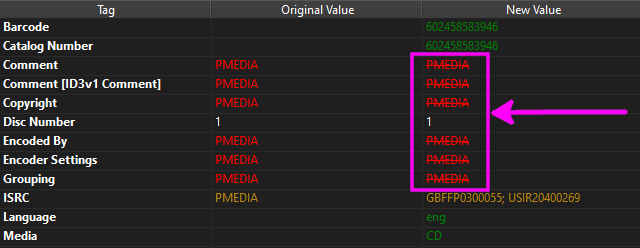
If you download MP3 files over Bittorrent, more often than not you will download one of PMEDIA's torrents which has the text "PMEDIA" or URL "www.t.me/pmedia_music" plastered in multiple ID3v2 tags of every mp3 file.
Since Picard allows you to create your own custom scripts, I finally went ahead and made the script below and confirmed it successfully deletes all of the tags that contain the text PMEDIA or their web address. If you know of a tag name that I missed please leave a comment below.
One tiny caveat is that the script only executes after you perform a lookup operation (while the media files are in the center pane, you would right-click on the Clustered folder and click Lookup which brings them to the right-hand pane). If you know how Picard works, you should know what I mean. You also need to make sure that Save Tags is selected from the Options drop-down menu.
If you're still unsure about what you need to do exactly, keep reading below past the screenshot for an explanation and examples.
The Script:
$if($in($get(comment:ID3v1 Comment),PMEDIA),$delete(comment:ID3v1 Comment))
$if($in($get(ENCODED-BY),PMEDIA),$delete(ENCODED-BY))
$if($in(%CONDUCTOR%,PMEDIA),$delete(CONDUCTOR))
$if($in(%copyright%,PMEDIA),$delete(copyright))
$if($in(%CREDITS%,PMEDIA),$delete(CREDITS))
$if($in(%comment%,PMEDIA),$delete(comment))
$if($in(%encodedby%,PMEDIA),$delete(encodedby))
$if($in(%encodersettings%,PMEDIA),$delete(encodersettings))
$if($in(%grouping%,PMEDIA),$delete(grouping))
$if($in(%isrc%,PMEDIA),$delete(isrc))
$if($in(%LABEL%,PMEDIA),$delete(LABEL))
$if($in(%label%,PMEDIA),$delete(label))
$if($in(%PROVIDER%,PMEDIA),$delete(PROVIDER))
$if($in(%RELEASECOUNTRY%,PMEDIA),$delete(RELEASECOUNTRY))
$if($in(%UPLOADER%,PMEDIA),$delete(UPLOADER))
$if($in(%PMEDIA%,www.t.me),$delete(PMEDIA))
$if($in(%SOURCE%,www.t.me),$delete(SOURCE))
$if($in(%WEBSITE%,www.t.me),$delete(WEBSITE))
$if($in(%WWWAUDIOFILE%,www.t.me),$delete(WWWAUDIOFILE))
$if($in(%WWWAUDIOSOURCE%,www.t.me),$delete(WWWAUDIOSOURCE))
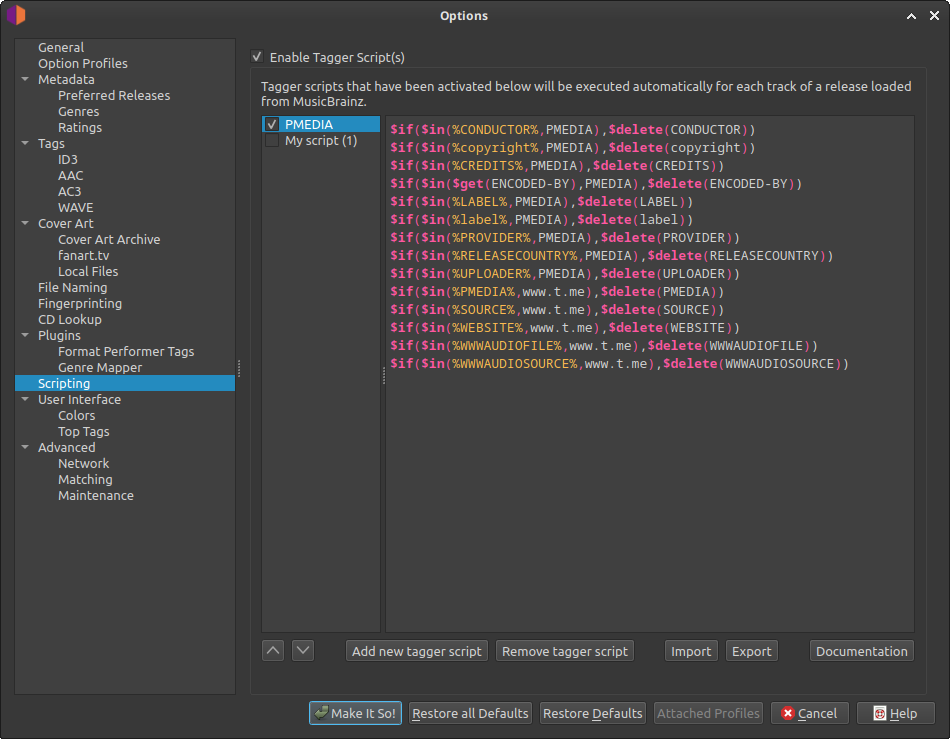
To delete a tag in Picard if it contains a specific string, you can use a tagger script with the $if() and $delete() functions. Here is an example script to achieve this:
$if($in(%tagname%, "string_to_find"), $delete(tagname))
Explanation:
$if(): This function evaluates a condition and executes a command if the condition is true.$in(%tagname%, "string_to_find"): This is the condition.%tagname%: Replacetagnamewith the actual name of the tag you want to check (e.g.,genre,comment,albumartist)."string_to_find": Replace this with the specific string you are looking for within the tag's value.
$delete(tagname): This is the command executed if the condition is true. It marks the specifiedtagnamefor deletion from the file when saving.
$get() inside the $in() function as shown in the script above.Example: To delete the comment tag if it contains the string "spam":
$if($in(%comment%, "spam"), $delete(comment))
Steps to implement in Picard:
- Open MusicBrainz Picard.
- Go to
Options>Scripting. - Add a new script or edit an existing one.
- Paste the script into the script editor, replacing
tagnameandstring_to_findas needed. - Save the script and apply the changes.
- Process your files with Picard, and the specified tag will be deleted if it contains the defined string.
 Travis Runyard
If you have any questions/comments regarding this article, click here or scroll down below (login isn't required to post comments and there's no waiting period).
